Sticky vs. Rotating Proxies: Which Type to Use and When
Sticky proxies hold one IP for your session, rotating proxies switch every request. Learn which one fits your task and when to use each.
Valentin Ghita
Technical Writer, Marketing, Research
Mihalcea Romeo
Co-Founder, CTO
TL;DR: The short version
- A sticky proxy holds onto one IP for a set window so a multi-step request can finish on a single identity.
- A rotating proxy hands you a different IP every request, or every few seconds, from a shared pool.
- Use sticky for anything with a session: logins, checkouts, account work. Use rotating for scraping and bulk data jobs.
- Sticky is not the same as static. A static ISP IP never moves. A sticky residential IP rotates the second your window expires.
- If you're not sure, rotate. Reach for sticky only when the task actually breaks without session continuity.
Sticky vs rotating proxies at a glance
Worth saying upfront: these aren't really two separate things you buy. It's one IP pool, used two different ways. Your traffic hits a backconnect gateway in either case, and the gateway is the part that decides what happens to your IP after request one. With sticky, it holds onto that IP for some window you've configured, often a few minutes, sometimes up to an hour if you push it. With rotating, the IP goes back into the pool right away and you get a fresh one on the next request, unless you've set a short timer to slow that down a bit.
So the decision isn't really about picking a different proxy product. The same residential, datacenter, or mobile pool can run either way, and you usually toggle between them by changing the session token in your proxy username. Same token across requests, you stay on one IP until the window closes. No token, or a fresh one each time, you get a new IP per request. The mode you want depends entirely on whether the site you're hitting is tracking you between requests. If it is, you need to look like one consistent visitor. If it isn't, you're better off looking like a thousand different ones.
| Factor | Sticky proxy | Rotating proxy |
|---|---|---|
| IP behavior | Same IP held across requests | Different IP per request or interval |
| Session length | Usually 1 to 60 minutes | Sub-second to a few seconds |
| Rotation trigger | Timer expiry or releasing the session ID | Every request, or a fixed timer |
| Anti-bot resilience | Good against session checks, weak against rate limits | Good against rate limits, weak against session checks |
| Best fit | Logins, checkouts, account work | Scraping, SERP tracking, price feeds |
| How it's priced | Often per IP or per port | Usually per GB of traffic |
| Geo flexibility | One region per session | Easy to spread across regions |
| Main thing that goes wrong | Browser fingerprints don't match the IP history | CAPTCHAs and broken |

Buy Rotating Residential Proxies
Real homeowner IPs that rotate on every request. Near-zero block rates for scraping and automation.
What Is a Sticky Proxy
A sticky proxy hands you one IP out of the pool and lets you hold onto it for the whole session. The hotel key analogy works pretty well here. You check in, they give you a key to one specific room, that's the only room it opens and the moment you check out the room goes back into circulation for the next guest. An IP does the same thing. You get assigned one, you use it for whatever window the provider gives you, and once the window's up it drops back into the pool for someone else.
Mechanically, sticky behavior runs through a backconnect proxy gateway. Two control patterns dominate. Port-based stickiness binds one IP to one local port, which works well for simple integrations and tools that cannot pass authentication tokens. Session-ID-based stickiness passes a token in the proxy username, so requests sharing the same token route to the same IP. The session ID approach scales better because you can open hundreds of distinct sessions from a single gateway endpoint. Typical session windows run from 1 minute to 60 minutes. Some providers let you set the window manually, others fix it.
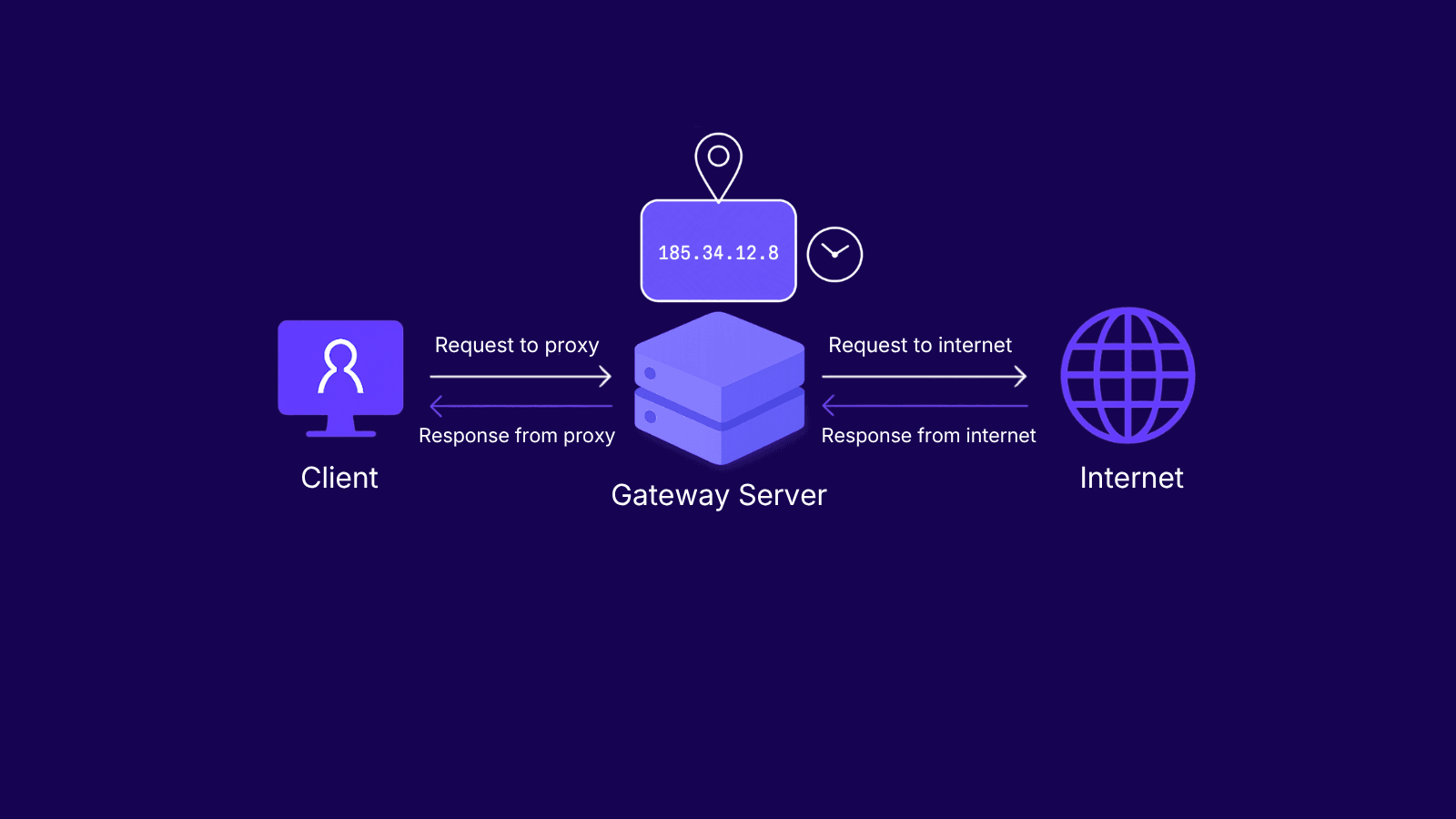
Sticky proxies are not static proxies. ISP proxies hold the same IP indefinitely, which is the true static option. A sticky residential session releases the IP when the timer expires and gives you a different one on the next session. For the static side of the comparison, read ISP proxies vs datacenter proxies.
What Is a Rotating Proxy
Rotating works the opposite way. Every request you send goes out through a different IP. The closest comparison I can think of is grabbing one of those rental scooters off the sidewalk. Whichever one is nearest, you take that one, ride it to wherever you're going, drop it off. Next time you need a ride, you grab a different scooter. That's basically what the gateway is doing with your traffic, swapping the address either on every request or after some short interval.
Pool size is the variable that matters most. A pool of a few thousand IPs burns out quickly under aggressive scraping. A pool of millions absorbs the same load without recycling addresses back to the requester for hours. The gateway picks an IP, routes the request, then returns the IP to the available set or quarantines it briefly. Good providers track per-IP health so flagged addresses get rested before reuse, which directly affects success rate on protected targets.
How that rotation actually triggers is something you configure. The two options are per-request, where you get a brand new IP every single time you send something out, which is what crawlers chewing through long URL lists want. Or per-timer, where the IP stays put for a set window of maybe 30 seconds, maybe a few minutes, which you need when a single page load fires off a bunch of sub-requests that all have to come from the same address or the page won't render right.
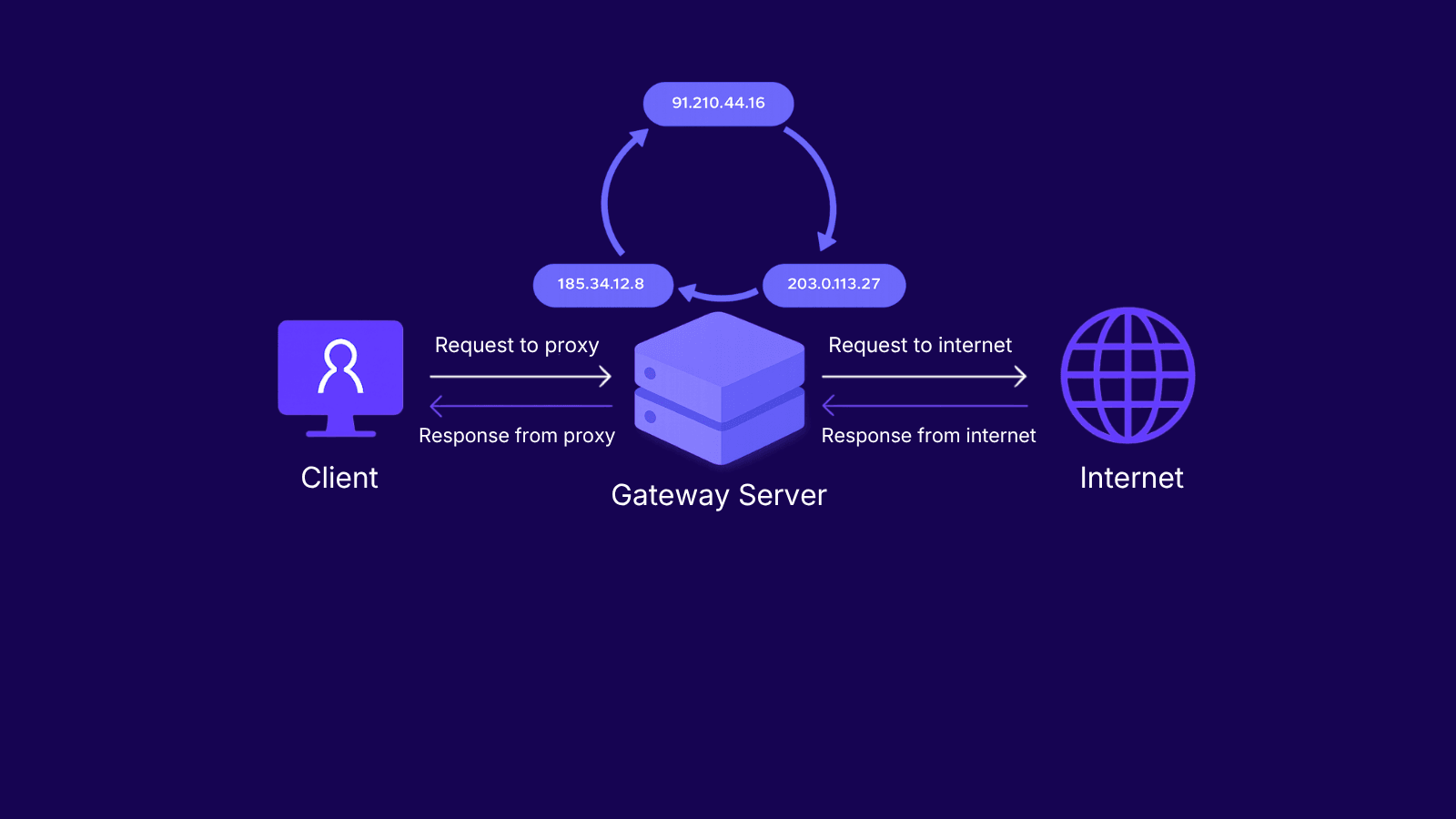
Both residential and datacenter pools support rotation. The gateway behavior is identical. Only the underlying IP type changes, which affects trust on strict targets but not the rotation mechanics themselves.
When to Use Sticky Proxies
Sticky proxies fit any workload where breaking the session breaks the task. The shared trait is state: the target site expects a stable identity across multiple requests, and any IP change inside that window flags as suspicious.
Managing multiple social media accounts is the clearest example. Each account needs its own consistent IP so the platform sees one user, one device, one location across the entire session. Rotating mid-session looks like account hijacking and triggers verification. The dedicated workflow is covered in detail in the guide on social media proxies.
Multi-step checkout flows depend on cookie and IP consistency. If the IP changes between cart, address, payment, and confirmation, payment processors and anti-fraud layers reject the order. Ad verification in a single region needs sticky behavior because the verifier has to navigate a campaign as a coherent visitor, not a stream of strangers. Account warm-up, where new accounts age slowly to look human, also requires one IP per account for weeks of consistent activity, otherwise the aging signal resets.
The main downside is fingerprinting risk. A sticky IP collects history. Cookies, headers, TLS fingerprints, and timing patterns accumulate against the same address. If the site cross-references that footprint, the IP eventually burns and the session ends in a block. Read more on how websites detect proxies for the detection side.
When to Use Rotating Proxies
Reach for rotating whenever each request is its own thing and a block just means you lost that one call, not a whole session. The real trigger though is volume. Once you're sending requests faster than a single IP can keep up with before the site starts rate-limiting, you basically have to spread the load across the pool to keep any individual address under whatever threshold the target is enforcing.
Large-scale web scraping is the canonical case. A crawler hitting thousands of URLs per minute exhausts any single IP within seconds. Rotation through rotating datacenter proxies keeps each request on a different address so rate limits never accumulate against one identity. SERP monitoring across keyword sets and locations works the same way: every query looks like a separate user.
Price aggregation across e-commerce catalogs benefits from rotation because product pages often apply per-IP request caps. Travel fare checks need rotation for a different reason: airlines and hotel sites inflate prices on repeat visitors from the same IP. Ad verification across multiple regions splits naturally across a rotating pool with geo-targeting enabled. Blacklist evasion is the same problem in reverse, where rotation keeps any single address below the flagging threshold.
The downside is session-breaking. Anything requiring login, cart, or checkout fails under rotation because the session state cannot survive an IP change. Aggressive rotation also triggers CAPTCHAs on protected targets. Mitigation tactics are covered in how to bypass CAPTCHAs when web scraping.
How to Choose Between Sticky and Rotating Proxies
Three questions resolve almost every choice between sticky and rotating proxies. Answer them in order.
First: does the task require session persistence? If yes, sticky. Logins, checkouts, account dashboards, anything that breaks when the IP changes. If the answer is no, move on.
Second: is request volume high enough to burn a single IP? Rate limits, CAPTCHAs at high request counts, and per-IP request caps all point to rotation. A few hundred requests per hour from one IP is sustainable on most targets. A few thousand per minute is not.
Third: do you need geo-variety? Rotating pools spread requests across cities and countries without manual configuration. Sticky sessions lock to one region for the duration of the window. Multi-region work usually wants rotation, especially for ad verification and pricing data that varies by location.
Most production workflows mix both. A hybrid pattern uses sticky proxies for the authenticated parts of the flow (login, cart, checkout) and rotates for everything around it (discovery, product browsing, price collection). Match proxy mode to the request, not the project.
The metric that actually matters is cost per successful request, not raw IP count or bandwidth. A million-IP rotating pool that triggers blocks on every request costs more in retries than a smaller sticky pool that gets through cleanly. Measure success rate first, then optimize price.
Conclusion
It comes down to one question: does your task need the same IP across requests? If yes, go sticky. Logins, carts, checkouts, account work, anything that breaks when the address changes. If each request stands alone and volume is the challenge, rotate. Scraping, SERP tracking, price feeds at scale.
Most setups use both, sticky for the steps that need one consistent identity, rotating for the bulk work around them.
If you're still unsure which type fits your use case, contact our support team and we'll help you pick the right setup.
Frequently asked questions
Frequently Asked Questions
What's the difference between sticky and rotating proxies?
A sticky proxy holds onto one IP for the length of a session, typically somewhere between 1 and 60 minutes depending on how you set it. A rotating one hands you a new IP either on every request or after some short timer. The underlying pool of IPs can be identical, the only thing that's different is what the gateway is told to do. With sticky you stay one consistent visitor; with rotating you basically show up as a new one every time.
Are sticky proxies the same as static proxies?
No, and people mix these up constantly. Static, which usually means ISP proxies, give you an IP that's just yours and never expires. Sticky residential or mobile is different. You only have the IP until your session window closes, after which it goes back into the pool for someone else to get assigned. Static is yours to keep. Sticky is borrowed with a return date.
How long does a sticky session last?
Usually between 1 and 60 minutes, depending on what the provider lets you configure. Some will go longer on residential, up to a few hours. Datacenter can hold for much longer than that because the IP is actually yours. One thing worth knowing about residential specifically: your session can end before your timer does. If the actual person whose connection is hosting your IP closes their laptop or loses signal, the IP is gone whether you were done with it or not.
Are rotating proxies better for web scraping?
For the bulk of scraping work, yeah. When you're firing thousands of requests across thousands of URLs, rotating keeps any single IP from hitting the rate limit because the traffic is spread across the whole pool. The catch is anything behind a login. The moment you cross into a logged-in area, that part of the flow needs to stay on one IP or the site will kick you. Most real-world scrapers end up doing both, rotating on the public side and pinning the session once they're authenticated.
Can I use rotating proxies for logging into accounts?
Not really. A login isn't one request, it's a chain of them, and all of them need to carry the same cookies and headers and come from the same IP. If the IP swaps partway through, the site sees two different addresses signing in within a couple of seconds and treats it as suspicious for obvious reasons. You'll get a captcha, a verification email, sometimes a block. Easiest thing is to run the login itself on a sticky session and then rotate later if whatever you're doing afterward doesn't depend on staying logged in.
Can I combine sticky and rotating proxies in the same workflow?
Yes, and most setups that have been running for any real length of time are already doing this. Sticky for the parts where the session has to hold, like login, cart, checkout. Rotating for everything else, browsing, discovery, anything bulk. Most providers let you switch between the two from the same endpoint by changing the session token in your proxy username, so it's not like you need two accounts or two gateways to manage it.
Which proxy types support sticky sessions?
Sticky is a session mode, not a product, and it runs on any pool that rotates: residential, mobile, and datacenter. On residential and mobile, sticky works on a timer the provider sets, holding one IP for a window before it returns to the pool. Datacenter sticky usually means pinning to a dedicated IP rather than pulling from a shared rotating set.