Datacenter vs. Residential Proxies: A Detailed Comparison
Learn how datacenter and residential proxies compare on speed, cost, block risk, and geo targeting. Pick what fits your project.
Valentin Ghita
Technical Writer, Marketing, Research
Mihalcea Romeo
Co-Founder, CTO
TL;DR: The short version
- Datacenter is the cheapest and fastest IP you can rent. It's also the type anti-bot systems catch first. Fine for SEO tools, public data scraping, app testing, anywhere the target site isn't really paying attention.
- Residential routes traffic through actual home connections. Blocks become rare, and you can pick the city or specific ISP you want to appear from. You pay for it in speed and per-gigabyte cost.
- ISP is the middle option. Real ISP addresses on datacenter hardware, static by default, unmetered bandwidth. Residential trust without the residential pricing model.
- What decides your bill is whether the plan bundles bandwidth or meters it. Datacenter usually bundles. Residential almost always meters per GB, and that gets brutal on image-heavy pages.
- Picking order, cheapest up: datacenter first, ISP when datacenter gets blocked, residential when ISP isn't enough, mobile only if the site is actively fighting you.
What Is a Datacenter Proxy?
A datacenter proxy routes your traffic through an IP hosted in a server farm or cloud environment. The IPs belong to hosting providers like AWS, Hetzner, or OVH, not a real consumer's home connection.
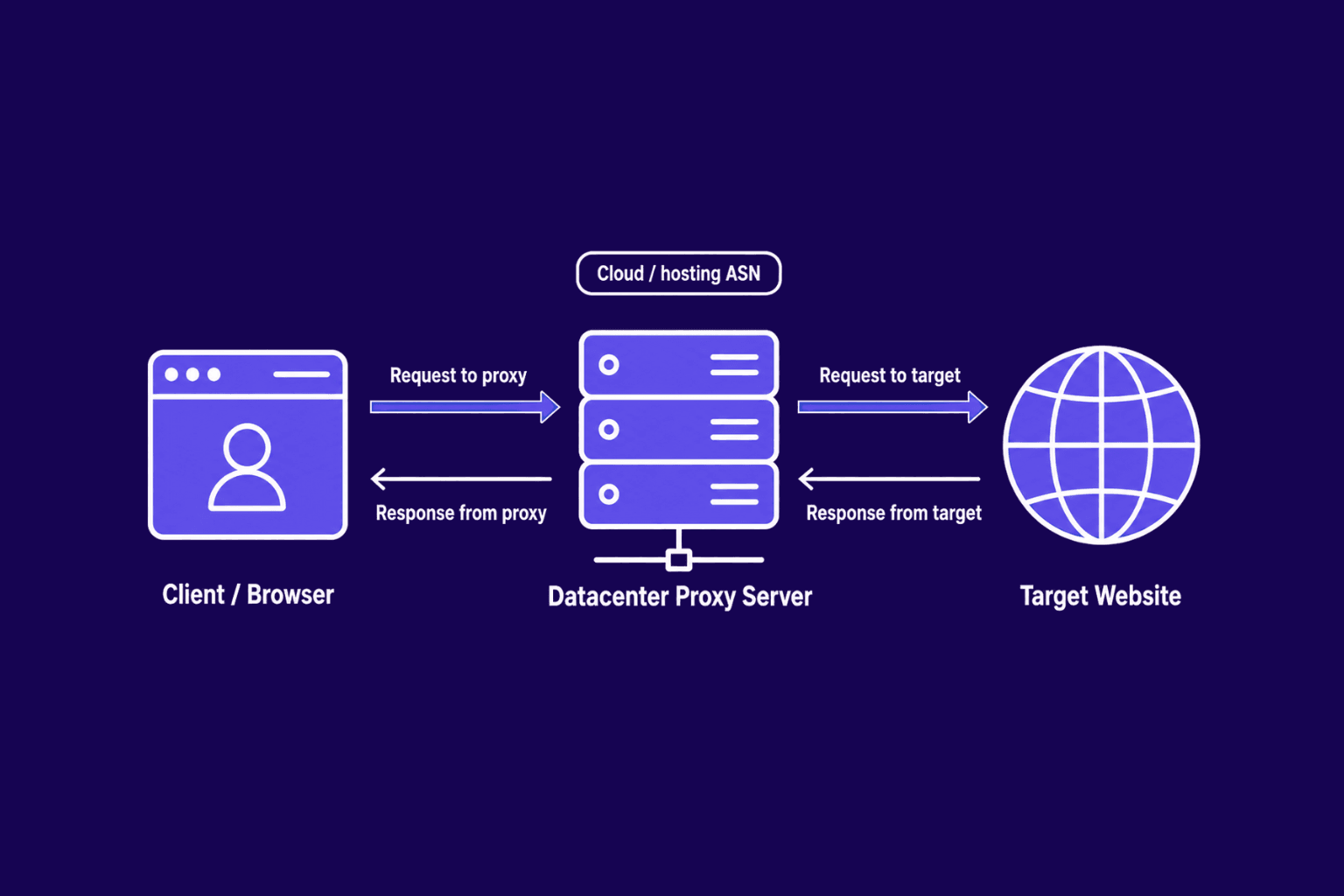
Tier-one facilities and heavy uplinks give you steady throughput and low latency. Datacenter IPs are the cheapest proxy type per IP, scale to thousands of concurrent requests, and ship with dedicated options for exclusive use. Most plans bundle unlimited or generous bandwidth, so you budget by IP count, not gigabytes. For high-volume work on targets that don't fight back, datacenter proxies are the obvious starting point.
Datacenter proxies split into a few flavors worth knowing before you buy. Static IPs hold the same address as long as you keep paying, which keeps sessions clean and predictable. Rotating datacenter proxies hand out a fresh IP per request or per session, which extends how long you stay under the radar before any single address picks up flags. Dedicated IPs belong only to your account; shared IPs spread across multiple customers and inherit whatever those customers already triggered on the target.
The trade-off shows up on protected sites. Detection systems group datacenter IP ranges by ASN and flag them on sight, since no normal user browses from a known cloud range. That raises IP ban risk on strict targets and limits where you can appear to be geographically. We unpack the technical side in our piece on how websites detect proxies.

Buy Rotating Residential Proxies
Real homeowner IPs that rotate on every request. Near-zero block rates for scraping and automation.
What Is a Residential Proxy?
A residential proxy routes your traffic through an IP an ISP has handed out to a real household device. To the destination site, the request looks like someone on a home connection. That illusion is what these networks sell.
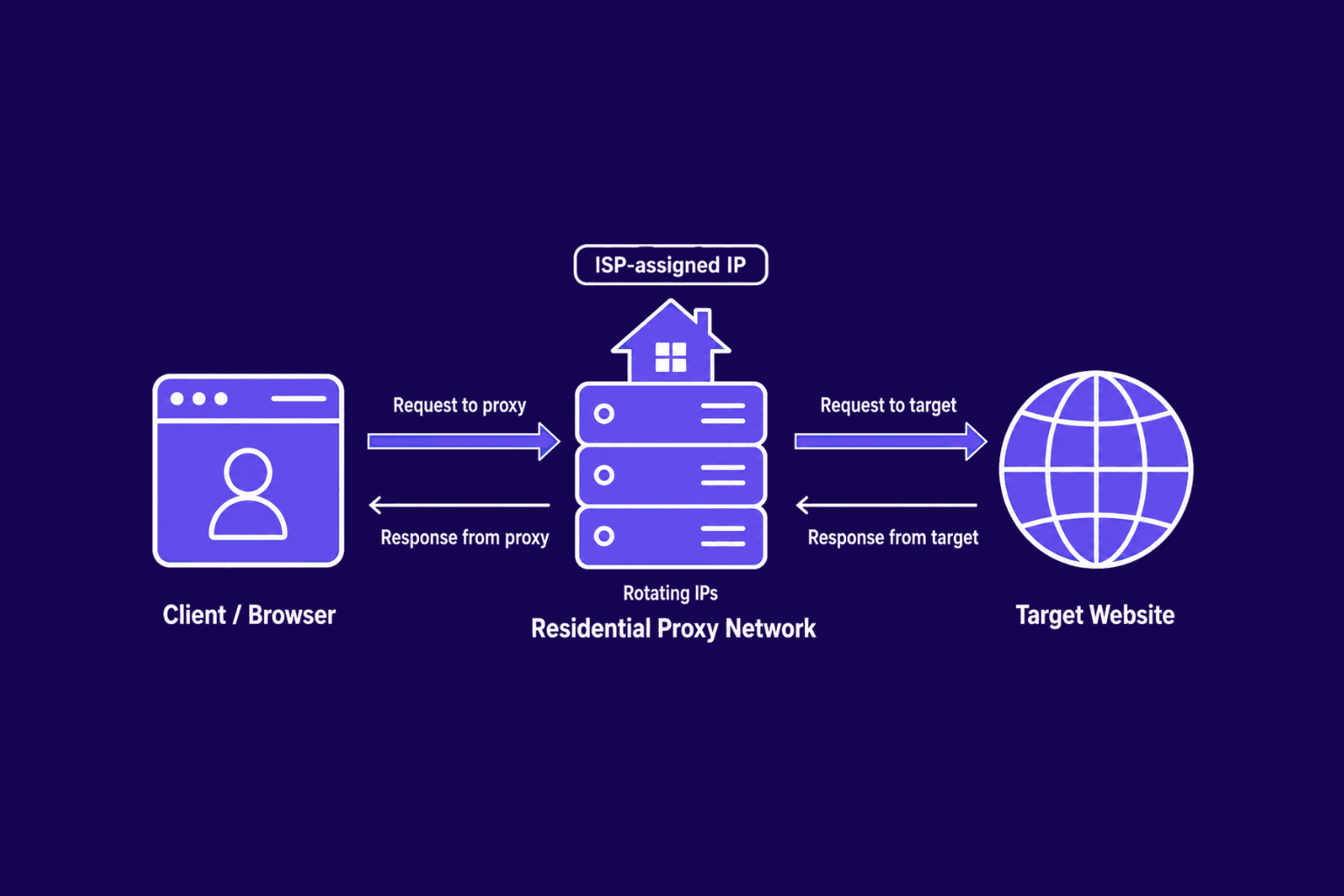
Most providers offer residential IPs as a rotating pool, so each request can come from a different IP and patterns are harder to track. Sticky sessions hold one IP for a set window when you need stability for logins, carts, or multi-step flows. Rotating residential proxies handle the swapping in the background, so you're not babysitting an IP list.
Residential traffic carries the natural fingerprints anti-bot systems expect, so block rates drop sharply on protected sites. Geo targeting also gets more precise, since pools span countries, regions, and individual cities.
Pool size claims need a sanity check. A provider advertising 50 million IPs doesn't mean 50 million are online right now. Real availability moves with the time of day in each country, since devices come and go with their owners. Quality also varies by sourcing: some networks pay app developers to embed an SDK that turns user devices into exit nodes, others source through VPN partnerships with explicit opt-in, and a few buy IPs from middlemen with murkier consent trails. The first two are legitimate. The third is what makes residential a minefield if you don't pick the provider carefully.
The downsides start with cost. Residential bandwidth is pricier than datacenter bandwidth, and most providers charge per gigabyte. Speeds depend on whichever home connection your request lands on. Ethical sourcing matters: informed consent from the IP holder is the floor, and networks built on less get providers sued and users blocked.
Datacenter vs Residential Proxies: Main Differences
| Aspect | Datacenter Proxies | Residential Proxies |
|---|---|---|
| IP source | Server farms, cloud providers | ISP-assigned home connections |
| Speed | High and consistent | Variable, generally slower |
| Cost | Low per IP | Higher, often per GB |
| Pricing model | Flat per IP or subscription | Bandwidth based |
| Block risk | Higher on protected sites | Lower across most targets |
| Geo targeting | Limited datacenter cities | Country, region, and city |
| Stability | Very stable | Varies with the host device |
| Bandwidth | Often unmetered | Metered per GB |
| Best for | High volume, low protection | Strict sites, location-sensitive |
| Main drawback | Easier to detect | Higher cost, slower |
IP source is the core divider. Datacenter wins on raw proxy speed and proxy cost, making it the default for large pulls against simple targets. Residential wins on trust: detection engines weigh "looks like a person at home" heavily. If your target runs Cloudflare, DataDome, PerimeterX, or a similar stack, residential traffic gets through more often.
Bandwidth is the cost axis people forget. Datacenter plans usually bundle generous or unmetered transfer. Residential plans charge per gigabyte, which compounds fast on image-heavy pages. On a multi-hundred-gigabyte job, that gap can swing your monthly bill by an order of magnitude.
Scaling looks different too. Datacenter networks grow in a straight line. Residential pools have more raw IPs but uneven availability, since devices come online and drop off all day. That churn is why a healthy proxy pool matters more for residential setups.
The metric worth tracking is cost per successful request, not cost per IP. A cheap proxy that fails half its requests on your target ends up more expensive than a pricier one with a 95% success rate, once you factor in retries, latency, and the inevitable hard block. That math flips the answer for some buyers: residential at three times the per-IP cost can still be cheaper than datacenter if the target burns through datacenter IPs in minutes.
Datacenter vs Residential Proxies: How to Choose
Pick the cheapest proxy type that gets the job done without getting blocked. Start with datacenter, move up to residential if the target keeps shutting you out. Both share the same authentication patterns (IP allowlist or username/password), so swapping is an endpoint change, not a code rewrite.
Before locking in a plan, run a small test against your real target URLs. A hundred to five hundred requests is enough to see what the target is willing to tolerate. Track three numbers: success rate, average response time, and how often you hit a CAPTCHA or 403. Most providers offer trials or money-back windows for exactly this reason. The cheapest proxy type that clears your success threshold wins. Anything else is guessing.
Choose Datacenter Proxies When
Go with datacenter when speed, predictable cost, and high bandwidth matter more than blending in. They suit SEO rank tracking, price monitoring on retailer feeds, app and website QA, market research on public data, and general web scraping on sites without serious bot defenses. Long sessions stay clean, since datacenter IPs don't drop the way some residential ones do.
Choose Residential Proxies When
Reach for residential when block risk is the main constraint, when traffic has to read as a real user, or when geo targeting accuracy matters. That covers ad verification, eCommerce price and inventory checks, localized SERP tracking across regions, travel fare checks, and any public data work where ISP- or city-level location changes the result.
ISP proxies sit between the two: IPs that real ISPs assign but which run on datacenter hardware. You get residential-grade trust at datacenter speed. They cost more than plain datacenter IPs and usually less per gigabyte than residential. They fit when you need long sticky sessions on sites that block datacenter traffic without the full rotation of a residential pool. Full breakdown in our ISP vs datacenter comparison.
Conclusion
If you came here trying to figure out which proxy type fits your project, the answer depends on what you're up against. For heavy bandwidth on simple targets, datacenter handles it. When the target runs serious anti-bot defenses or your work depends on appearing in a specific city, residential earns the cost difference. ISP sits between the two, which is where a lot of buyers actually land once they realize a few protected sites need session stability that residential rotation can't deliver.
Once you've settled on a direction, the next step is picking a provider that lets you trial the type against your real workload before locking in. At Anonymous Proxies we cover the full ladder: datacenter and rotating datacenter for bandwidth-heavy work, ISP proxies for stable sessions on protected sites, and rotating residential or rotating mobile when the target is genuinely hostile. Start with the cheapest type that clears your success threshold. Scale up only when the data says you have to.
Frequently Asked Questions
Frequently Asked Questions
Are residential proxies legal?
Yes, in any major jurisdiction. What matters is what the traffic does and where the IP came from. Networks built on informed consent from the IP holder are legal. Whatever would get you banned on a normal connection (credential stuffing, paywall scraping, evading bans) is still off-limits behind a proxy.
Are free datacenter or residential proxies worth using?
For anything that matters, no. Free pools are slow, oversubscribed, and already burnt on most useful targets. Many also log requests, inject ads, or strip TLS, which makes them a bad fit for anything sensitive or account-related.
Can I use datacenter proxies on social media?
Most platforms block known datacenter ranges on sight and burn accounts fast. Residential or mobile proxies are the realistic option. ISP proxies sometimes work for warmer accounts.
What's the difference between shared and dedicated datacenter proxies?
A shared IP rotates among several customers; a dedicated IP belongs to one. Shared is cheaper but inherits whatever reputation the other users built. Dedicated costs more but the only history on the IP is yours.
Do residential proxies guarantee you won't get blocked?
No. Residential lowers the odds substantially, but request rate, fingerprint, and behavior still get detected. A residential IP firing 600 requests per second still looks like a bot.
How do I tell if a site is blocking my datacenter proxy specifically?
Hit the same URL without the proxy. If your home IP gets a 200 and the proxy gets a 403 or a CAPTCHA, the IP type is the problem. If both fail, look at headers, rate, or auth.
Can I use residential proxies for streaming services?
Sometimes. Streaming platforms run dedicated proxy detection that eventually catches even residential pools. Residential lasts longer than datacenter, but there's no permanent answer.
Where do mobile proxies fit compared to these two?
Mobile proxies route through cellular networks (4G/5G) and carry the strongest trust signals of any IP type. They're slower and pricier than residential, but right for hardened mobile-app targets where even residential gets flagged.