
HTTP vs SOCKS Proxies: Key Differences & Which to Use
HTTP vs SOCKS proxies compared: how each works, speed, security, ports, and use cases, plus a simple rule for picking HTTP or SOCKS5 for your task.
Valentin Ghita
Technical Writer, Marketing, Research
Mihalcea Romeo
Co-Founder, CTO
TL;DR: The short version
- HTTP proxies work at the application layer. They read web traffic, which lets them cache pages, filter content, and manage request headers.
- SOCKS5 proxies forward any traffic, TCP or UDP, without reading it. That covers torrents, games, email, and every app outside the browser.
- SOCKS5 carries less overhead per request. HTTP proxies claw speed back on repeat requests through caching.
- Neither protocol encrypts your traffic on its own. HTTPS stays encrypted through both.
- Quick rule: web-only tasks take an HTTP proxy, everything else takes SOCKS5.
What Is an HTTP Proxy and How Does It Work?
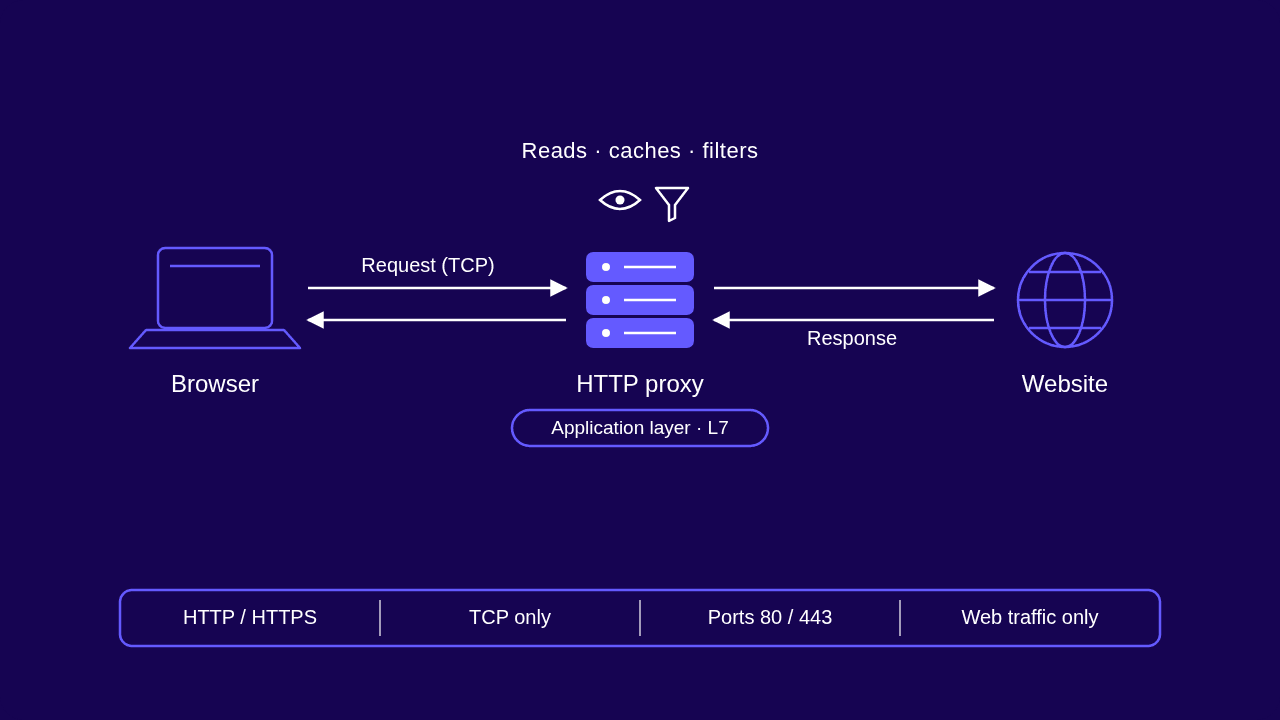
An HTTP proxy is a server that handles web traffic on your behalf. Your browser sends its request to the proxy instead of the website. The proxy forwards it, picks up the response, and hands it back. The site sees the proxy's IP address, not yours.
Because it operates at the application layer, an HTTP proxy understands what passes through it. It reads URLs, headers, and response codes. Everything useful it does comes from that: it can cache a page and serve the stored copy on the next request, block domains on a filter list, or rewrite headers before they reach the target.
HTTPS works differently. Encrypted traffic passes through an HTTP proxy via the CONNECT method: the proxy opens a tunnel to the destination and relays the encrypted bytes without reading them. So an HTTP proxy can carry HTTPS. It just can't see inside the tunnel. Nearly all secure browsing through office and provider proxies runs on this exact mechanism.
Our guide to what HTTP proxies are walks through setup and real use cases in more depth.

Buy SOCKS5 Proxies
Dedicated IPs, any TCP traffic, unlimited bandwidth. Works with every app that supports SOCKS5.
What Is a SOCKS Proxy and How Does It Work?
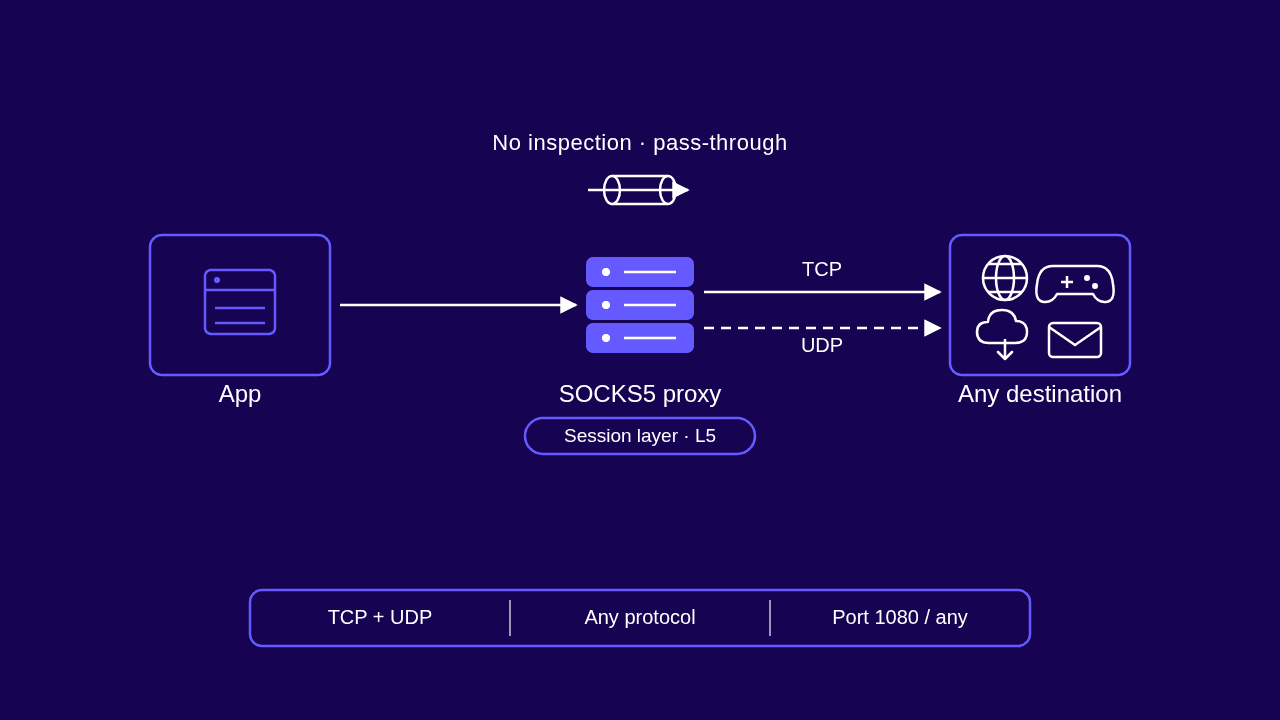
A SOCKS proxy is a general-purpose relay. Your application connects to the proxy, the proxy opens its own connection to the destination, and from then on it shuttles bytes back and forth without reading them. A web page and a game packet look the same to it.
You'll run into two versions. SOCKS4 is the older one; it only handles TCP and has no built-in authentication. SOCKS5, defined in RFC 1928, is the current standard. It adds UDP support, username/password and GSSAPI authentication, IPv6 compatibility, and remote DNS resolution. That last feature is easy to overlook. The proxy resolves hostnames for you, so DNS lookups never leave your machine and nothing on the local network sees which domains you're visiting.
Because the protocol sits at the session layer, below applications, it works with anything that speaks it: browsers, torrent clients, SSH, email software, custom bots. We break down what a SOCKS proxy is and how to set one up in a separate guide.
HTTP vs SOCKS Proxies: Key Differences
Both proxy types hide your IP address. Everything else about them follows from one design decision: how much of your traffic they read.
Protocol Layer and Traffic Handling
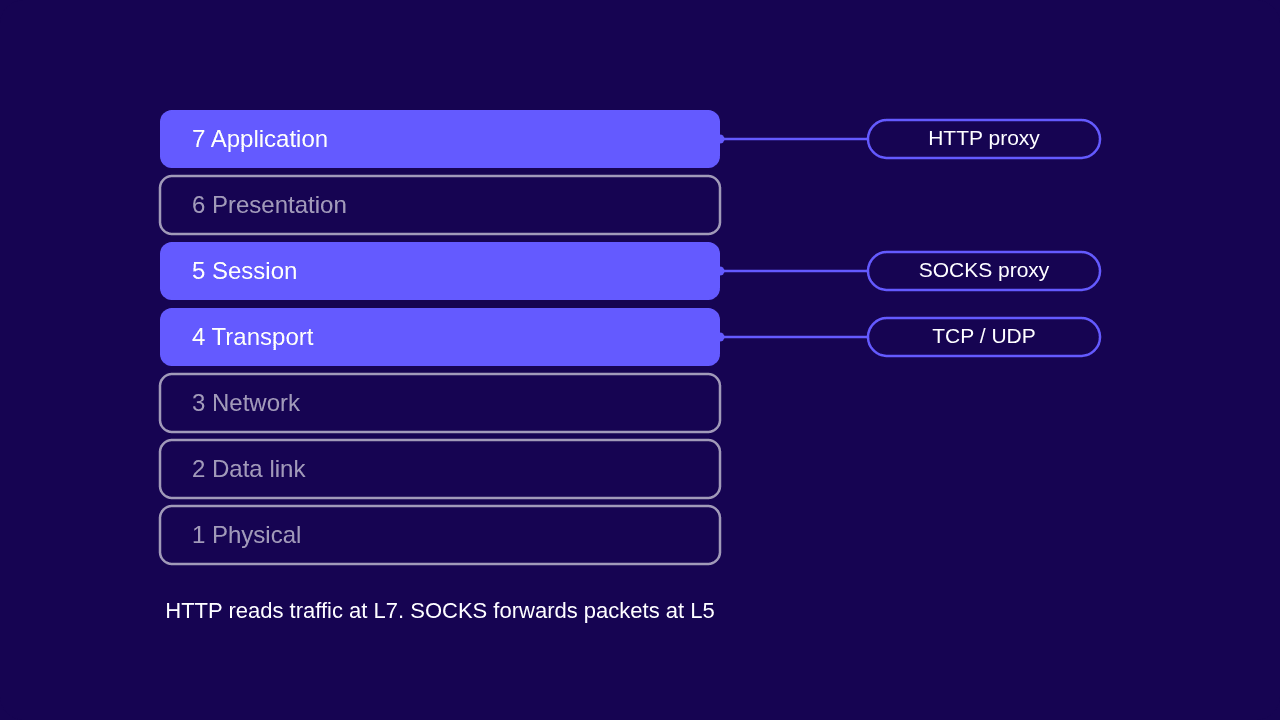
An HTTP proxy operates at layer 7 of the OSI model, the application layer. It parses every request, which is exactly why it can read and rewrite the traffic. A SOCKS5 proxy operates at layer 5, the session layer. It treats your data as an opaque stream and forwards it untouched.
The practical difference: an HTTP proxy participates in the conversation, while SOCKS5 is a courier. Participation buys you control over web traffic. The courier model buys you compatibility with everything else, plus fewer errors, since nothing gets rewritten along the way.
Protocol and Port Support
HTTP proxies carry web traffic over TCP. They usually listen on port 8080 or 3128, while the traffic they forward targets ports 80 and 443. That's the whole scope: if an application doesn't speak HTTP, an HTTP proxy can't help it.
SOCKS5 carries both TCP and UDP traffic, including QUIC, for any protocol an application uses. The default listening port is 1080, but a SOCKS5 server can run on any port you choose, which helps on networks that block the usual ones.
Speed and Performance
SOCKS5 does less work per request. There's no header parsing and no rewriting, just a handshake and raw forwarding, so it scales better under heavy concurrent load and handles the UDP traffic that HTTP proxies can't carry. HTTP proxies make up for it on repeated requests: a cached response comes straight from the proxy without a round trip to the origin server. For a single web request, the difference between the two is negligible. Pick based on traffic type, not benchmark charts.
Security and Anonymity
Neither protocol encrypts your traffic by itself. HTTPS stays encrypted end to end through both, and anything sent as plain HTTP is readable by the proxy operator either way. If you want encryption on top of IP masking, weigh a SOCKS5 proxy against a VPN before you commit to either.
Inspection cuts both ways. In a managed network, an HTTP proxy's ability to read traffic is a security feature: administrators use it to block malware domains and enforce content policy. For anonymity, SOCKS5 has the edge. It adds no proxy-revealing HTTP headers such as Via or X-Forwarded-For, the same headers that separate transparent from elite anonymous proxies. To the destination, a SOCKS5 connection looks like a direct one.
HTTP vs SOCKS Comparison Table
Here is the full comparison at a glance.
| Feature | HTTP Proxy | SOCKS5 Proxy |
|---|---|---|
| OSI layer | Layer 7 (application) | Layer 5 (session) |
| Supported traffic | HTTP and HTTPS only | Any protocol |
| Transport protocols | TCP | TCP and UDP, including QUIC |
| Default ports | 8080, 3128 (targets on 80/443) | 1080, configurable to any port |
| Traffic handling | Inspects and can modify requests | Blind relay, nothing changed |
| Caching and filtering | Yes | No |
| Authentication | Basic, sent in HTTP headers | Username/password, GSSAPI |
| Typical speed profile | Faster on cached repeat requests | Lower overhead, better under load |
| Best for | Web scraping, filtering, caching | P2P, gaming, non-web apps |
When to Use an HTTP Proxy
Reach for an HTTP proxy when everything you route is web traffic. Web scraping is the main case: scrapers talk to HTTP and HTTPS targets, and an HTTP proxy lets you rotate the User-Agent and other headers at the proxy layer, which lowers your block rate. Header control also lets you test how a site responds to different browsers and locales without touching your scraper code. On protected targets, pair that setup with rotating residential proxies so each request leaves from a fresh household IP instead of a flagged one.
Caching and filtering are the other two jobs. A caching proxy speeds up tools that hit the same URLs all day, price monitors and uptime checkers being the obvious examples. Filtering proxies enforce access policy in offices and schools. For high-volume, low-risk work like SEO tracking or bulk automation, datacenter proxies keep the cost per IP low and the speed high.
When to Use a SOCKS5 Proxy
Use SOCKS5 the moment any part of your traffic leaves the browser. Torrent clients depend on it: peer connections and DHT lookups run over UDP, which rules out an HTTP proxy entirely. The same UDP support makes SOCKS5 the right pick for online gaming, where you want a different IP without an encryption penalty on latency, and for streaming from another region.
It also covers the quiet cases: email clients, SSH sessions, and any bot or tool that speaks its own protocol. And because a SOCKS5 server can listen on any port, it slips through firewalls that block the standard proxy ports. Our SOCKS5 proxies run on dedicated datacenter or ISP IPs with full TCP and UDP support, so one endpoint handles every app you point at it.
Which One Should You Choose?
Two rules settle most cases. If every request you send is HTTP or HTTPS and you want caching or header control, use an HTTP proxy. If anything in your stack uses UDP or a non-web protocol, use SOCKS5. It carries web traffic too, so choosing it costs you nothing in compatibility.
One tiebreaker: if a target fingerprints proxy headers, SOCKS5 wins by default, since it never adds any.
Configuration is rarely the deciding factor. Most tools accept both protocols with a one-line change, for example curl -x http://host:port versus curl -x socks5://host:port, or socks5h:// if you want the proxy to handle DNS lookups too. Switching later is cheap, so pick for your current traffic and move on.
| Task | Use |
|---|---|
| Web scraping (HTTP/HTTPS targets) | HTTP proxy |
| Content filtering and caching | HTTP proxy |
| Torrenting and P2P | SOCKS5 |
| Online gaming | SOCKS5 |
| Non-HTTP apps (email, SSH, bots) | SOCKS5 |
| Bypassing strict firewalls | SOCKS5 |
Final Thoughts
The decision is about your traffic, not the proxies. HTTP proxies read web requests; that's why they're good at scraping, caching, and filtering. SOCKS5 never looks inside the stream and will carry everything else, torrents and games included. Neither one encrypts, so treat both as IP tools rather than privacy shields. If you're still not sure, tell our support team what you're running and they'll point you to the right one.
Frequently asked questions
Frequently Asked Questions
Can I use a SOCKS5 proxy for normal web browsing?
Yes. Firefox has native SOCKS5 settings, and Chrome can use one through your system proxy configuration or a launch flag. It makes sense when you already route other apps through the same endpoint and want your browser on the same IP, or when you want no proxy-related headers attached to your requests.
Do I need a SOCKS5 proxy if I already use a VPN?
They solve different problems. A VPN encrypts all traffic from your device and routes it through one tunnel, while SOCKS5 routes individual applications without encryption overhead. Run a VPN for everyday privacy, and add SOCKS5 when a single app needs its own IP or lower latency. Our SOCKS5 Proxy vs VPN guide covers the trade-offs in detail.
Can the same proxy support both HTTP and SOCKS5?
Often, yes. Many providers expose both protocols on the same IP address through different ports, so you switch by changing the port and the scheme in your client. Check your provider's dashboard for the port assigned to each protocol.
Are free HTTP or SOCKS5 proxies safe?
Generally, no. Free operators have to cover their costs somehow, and the usual methods are logging and selling your activity, injecting ads or malware into unencrypted pages, or reselling access to your connection. The IPs are also shared by thousands of users, so most arrive already blacklisted.
Can websites detect that I'm using a proxy?
Yes. Detection rarely depends on headers alone. Sites check the connecting IP against reputation databases that flag datacenter ranges and known proxy addresses, and they watch behavioral signals like request rate and timing. A clean SOCKS5 connection from a flagged IP still gets challenged.