How to use cURL with proxy? Step‑by‑Step Guide & Tips
This article will walk you through every click and command you need to pair cURL with any proxy—static, rotating, or sticky—so you can scrape, test, or debug from any location without tripping rate limits or geo‑locks.
Valentin Ghita
Technical Writer, Marketing, Research
Mihalcea Romeo
Co-Founder, CTO
What is cURL?
cURL—short for Client URL—is both a command‑line tool (curl) and a transferable library (libcurl) that can send or receive data through more than 20 internet protocols, including HTTP, HTTPS, FTP, IMAP, and SCP. Because it ships with macOS, almost every Linux distribution and with Windows 10 since build 1803, it has become the de‑facto Swiss‑army knife for developers who need to test APIs, download files, scrape pages, or debug network flows. Its popularity also stems from three traits:
- Uniform syntax – one flag set works across protocols and operating systems.
- Script‑friendliness – exit codes, silent mode (
-s), and piping play nicely with Bash, PowerShell, or CI pipelines. - Extensibility – hundreds of flags cover compression, parallel transfers, HTTP/2, custom headers, resumes—and robust proxy support.
Why pair cURL with a proxy?
Sending requests straight from your own IP is fine for a quick test, but real‑world automation (web scraping, geo‑testing, load simulation) quickly reveals two limits: rate throttling and geolocation locks. Inserting a proxy server between cURL and the destination site changes the game:
- Anonymity & rotation – every request can appear to come from a different address or region, making blocks harder.
- Geo‑targeting – you can “stand” virtually in Paris, São Paulo, or Tokyo to see local content or price variations.
- Corporate compliance – many companies route outbound traffic through gateways that inspect, log, or shape traffic.
How to Use a Proxy With cURL
Below you’ll find a complete walk‑through, from prerequisites to advanced rotation.
1. Prerequisites
Before typing your first command, make sure you have:
- cURL version 7.0 or later – check with
curl --version; anything older lacks modern TLS fixes. - A proxy endpoint – host and port supplied by your provider (HTTP, HTTPS, or SOCKS4/5).
- (Optional) Credentials –
username:passwordfor paid or authenticated pools. - A target URL – a site such as
https://httpbin.org/iporhttps://google.comthat echoes your origin, so you can verify the proxy. Premium residential or ISP proxies are ideal for production; free lists break often and can leak traffic.
2. Installing cURL
macOS
Open Terminal and run:
Windows
On most modern Windows machines (Windows 10, version 1803 or later), curl is already pre-installed. To avoid confusion with PowerShell’s alias for Invoke-WebRequest, run curl.exe explicitly to verify:
Linux
Most distros bundle cURL, but if yours doesn’t:
Check your installation with curl --version—you should see version, features, and supported protocols.
3. Understanding the syntax
A minimal proxy call has two ingredients: -x (or --proxy) followed by the proxy URL, then the destination URL.
Key points:
-xand--proxyare identical; pick your style.- If you omit the protocol, cURL assumes
http://. - Default ports are
1080for HTTP/SOCKS and443for HTTPS proxies.
Switching protocols
The rest of the command stays identical; only the scheme changes.
4. Handling authentication
Some premium pools guard access by user/password or token. You have two options:
If the password contains @ or :, always wrap the entire proxy URL in quotes to stop the shell from misinterpreting it.
5. Persistent proxies with environment variables – the detailed way
Using environment variables lets you route every subsequent curl command through the same proxy without typing -x each time.
How it works
http_proxy– URL of the proxy cURL should use for plain HTTP requests.https_proxy– URL of the proxy cURL should use for HTTPS requests (yes, the name is a bit confusing—the variable still governs HTTPS).
macOS & Linux
From now on, every curl you run in that shell inherits the proxy:
returns something like:
Turn the proxy off by un‑setting the variables:
Your next request will hit the internet directly again.
Windows (PowerShell)
Important: after setting the variables, call the binary explicitly to avoid PowerShell’s curl alias:
You should again see the proxy’s IP in the JSON response.
Clear the settings when you’re done:
curl.exe (and everything else in that session) now reverts to your real network connection.
6. The .curlrc shortcut
Sometimes you need a proxy for cURL and nothing else—no browsers, no Python scripts, no system‑wide variables. That’s exactly what the per‑user cURL configuration file is for.
macOS & Linux
- Open a terminal and jump to your home folder:
2. If the file doesn’t exist, create it; otherwise open it for editing:
3. Add a single line that tells cURL which proxy to use (credentials optional):
4. Save and exit (Ctrl‑O, Enter, Ctrl‑X in nano). From now on, every plain curl command in that account automatically tunnels through the proxy:
The service should return the address your proxy exposes. To override the setting on a one‑off basis, just add --noproxy "*", or point -x at a different endpoint.
Windows
- Open Command Prompt and discover where your roaming profile lives:
You’ll see something like:
2. In that folder, create a file called _curlrc (note the leading underscore) and paste the same proxy directive:
3. Save the file. Launch PowerShell, and remember to call the real binary so you bypass PowerShell’s alias:
You should see the proxy’s IP in the JSON response.
7. Overriding or skipping proxies
- One‑off override:
- Bypass for specific hosts:
These flags ignore any environment variables or .curlrc.
8. Quickly toggling the proxy on & off
(macOS / Linux)
Sometimes you only need a proxy for five minutes and don’t want to re‑type -x or touch system‑wide variables. A pair of shell aliases can do the heavy lifting.
- Open a terminal and jump to your home folder:
2. Create (or edit) .bashrc—the script your shell reads on every new session:
3. Drop in two one‑liners that flip the proxy on and off. Replace the URL with your own endpoint (credentials optional):
4. Save the file, reload your profile (source ~/.bashrc), or just open a fresh terminal.
How to use it
That’s it—no more copy‑pasting long proxy strings.
Windows
PowerShell lets you bind the same logic to quick aliases or functions:
These functions live only for the current session; add them to your $PROFILE file if you want them every time PowerShell opens.
9. Troubleshooting quick wins
- “Failed to connect” – ping the proxy, double‑check port, confirm VPN or firewall rules.
- HTTP 407 (Proxy Auth Required) – credentials wrong; re‑enter
--proxy-user. - SSL certificate warning – some proxies re‑sign TLS; add
-konly while testing. - Endless redirects – you’re hitting an HTTPS site via an HTTP‑only proxy; switch to
https://or a CONNECT‑capable tunnel.
Choosing the right proxy type
Not all proxies behave the same. Here’s how they differ:
- Datacenter – blazing fast but shareable IP ranges that can get flagged quickly by e‑commerce or social networks. Ideal for bulk, low‑stakes scraping.
- Residential – genuine home IPs; blend in perfectly on retail, SERP, or social sites but cost more.
- ISP (static residential) – best of both worlds: speed of datacenter plus the trust of residential. Great for SEO monitoring or session logins.
- Mobile – 3G/4G carrier addresses with the highest trust score. Perfect for ad verification or mobile‑first apps.
How to Use a Rotating Proxy With cURL
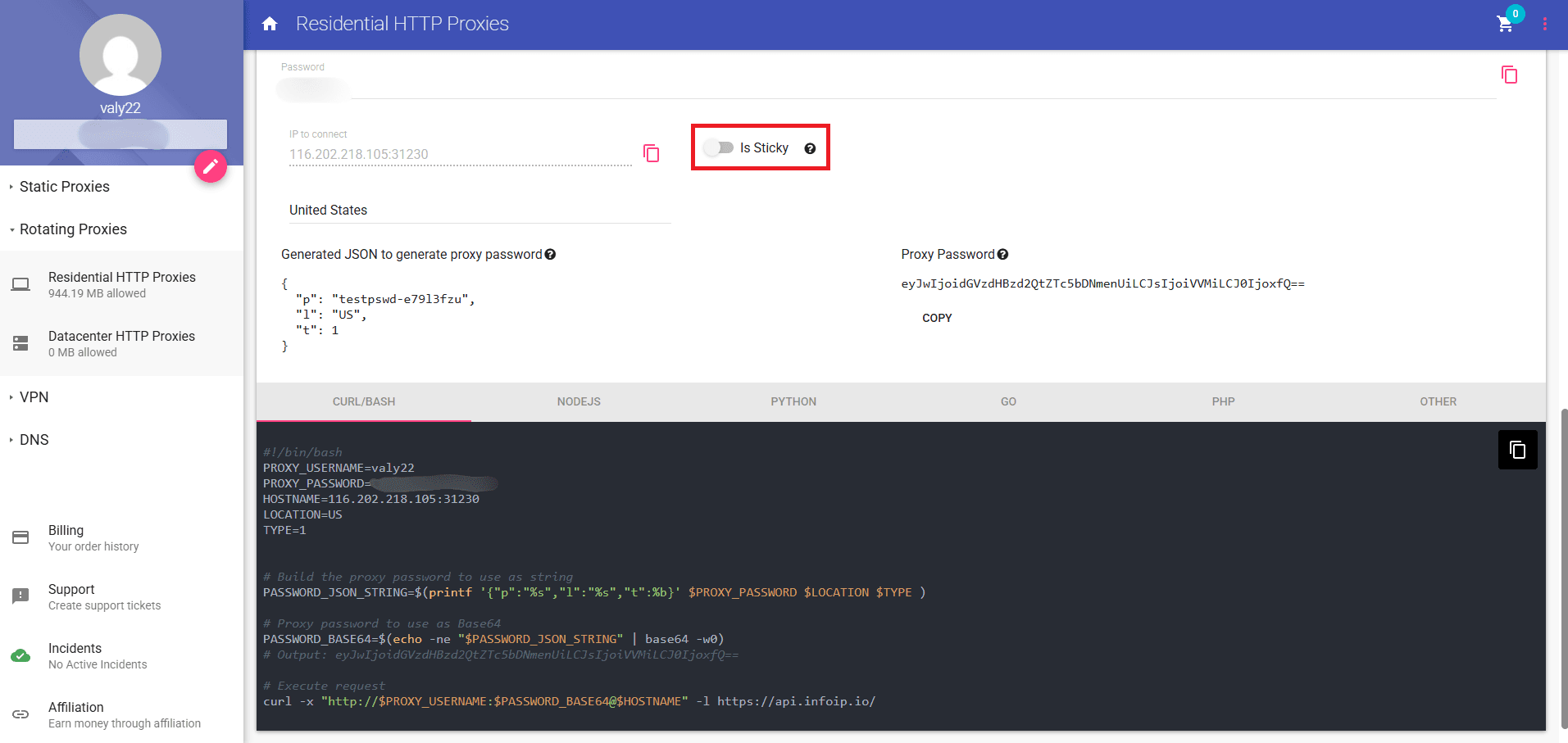
Be sure that you are logged in to your Anonymous Proxies dashboard account because you will need to copy three things from there—your rotating proxy's IP, your username, and the special password string we generate for you. Now, you just need to copy those values into the template below.
Run the command and the JSON response should show an IP that isn’t yours.
And if you want a sticky IP instead of a new one every call, you just need to flip the “Is Sticky” switch in the dashboard before you copy the auto-generated password.
Conclusion
Mastering proxies in cURL boils down to three flags—-x, --proxy-user, and --noproxy—plus two configuration layers: environment variables ($http_proxy, $https_proxy) and an optional .curlrc file. Combine those basics with the right proxy flavor—datacenter for speed, residential for stealth, or a managed rotating gateway for effortless scale—and you’ll scrape, test, or debug from any corner of the internet without tripping over firewalls, geo‑locks, or anti‑bot shields. Keep the troubleshooting tips handy, automate rotation when workloads grow, and always operate ethically. Follow the steps in this guide and your next curl command will glide through the web as smoothly as if you were right there on the wire.

Buy Backconnect Proxies
Rotating IPs on every request. Scale scraping and automation without manual IP management.