Wireguard split tunnel - how to do it
Learn how to create a wireguard split tunnel and allow only certain apps to go through the VPN tunnel
Valentin Ghita
Technical Writer, Marketing, Research
Mihalcea Romeo
Co-Founder, CTO
I see a lot of requests and questions regarding VPN split tunneling and how to effectively do it. Since we are selling Wireguard VPN and Amnezia VPNs ourselves, I figured this would make a good article and guide everyone on this path. You see, for both Wireguard and Amnezia, we sell the service itself and direct our users towards the official client apps. We do that to avoid any questions regarding privacy issues. VPN providers have gotten a bad rep lately for reasons that are outside of this scope.
What is VPN split tunneling?
Suppose you have a VPN and you run it on your system but you discover that it tunnels the traffic of the entire system and that's not your intention. Maybe you want a single application or many to go through the tunnel or the entire system BUT a single app or many. To do that, you need to create a split tunnel where some apps access the internet through the regular internet connection and other ones do it through the VPN tunnel. There are many types of split tunnels, based on user's needs:
App-based split tunneling
This is a split created based on rules that involve certain applications like we discussed in our previous paragraph. The rules target applications and all traffic generated by selected applications will follow the rules when communicating.
Destination based tunneling
On a destination based tunneling the rules are in effect only when certain destination addresses are being contacted by your operating system. The rules can contain a single address like 1.1.1.1 or a subnet in the form of 1.1.1.0/24.
Inverse split tunneling
For the situations when you want your entire system through the VPN but you wish to have certain apps to access the internet using the main internet connection. This can be app based or destination based also.
VPN slipt tunneling scenarios
We get these requests quite often so here's a list with the top mentions when it comes to VPN split tunneling
Tunneled work apps
Certain remote work requires that you connect to a VPN before being able to access internal resources at work. Often times, you are required to connect to a VPN for that but this routes all apps on your system via the tunnel as well and you might want to avoid that due to privacy concerns, better internet or to avoid getting banned online due to a VPN detection.
Streaming vs gaming
Streaming requires a lot of bandwidth and you may not want to do that when doing a stream & game combo. To avoid buffering and interruptions, a VPN tunnel is a good idea.
Accessing geo-restricted content
As the title says, if you want to access content that is geo restricted in your country, a VPN is a good idea but that often means just the browser or certain apps such as Discord. You don't need the entire operating system to access via the VPN so you create a tunnel.
How to create the VPN split tunnel
For that task to work you will need to grab your Wireguard or Amnezia VPN configs from your account. Now go ahead and install Wiresock from their website. This app is able to run wireguard or amnezia wireguard VPN configs and it has advanced settings for split tunneling. I will embed some of their official screenshots to gouide you through once your VPN config is imported.
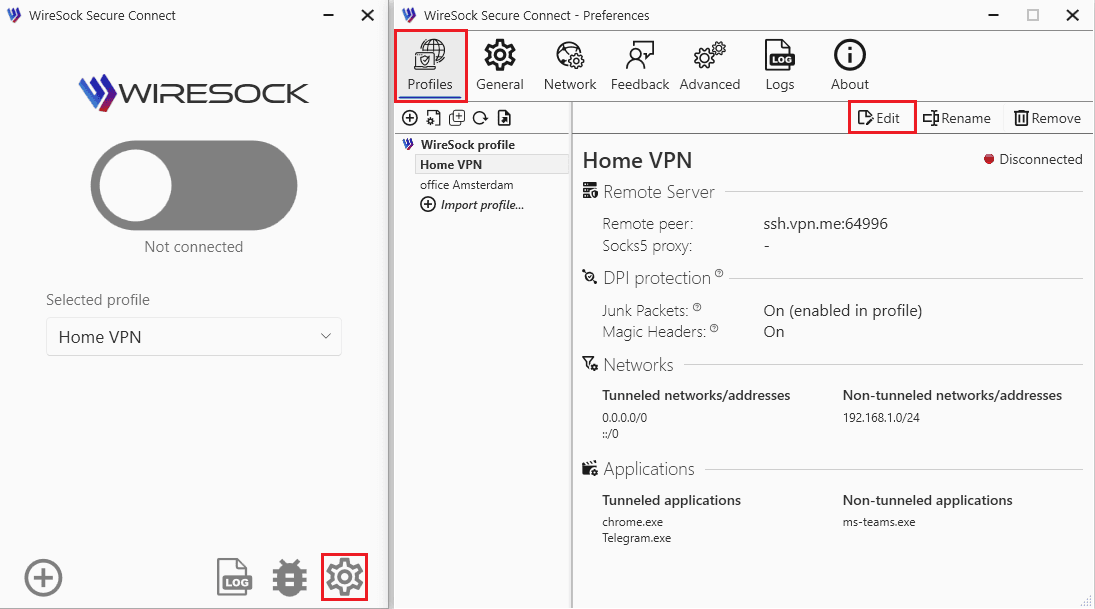
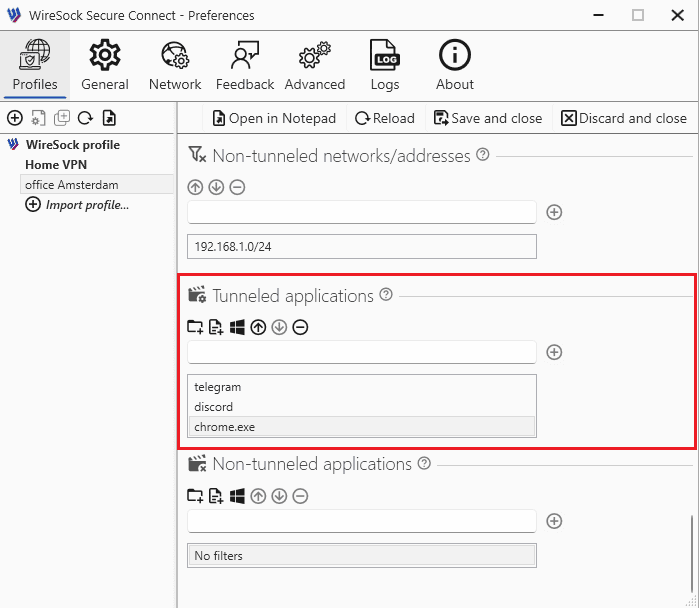
The app has many more settings that address the entire array of split tunneling options discussed above so feel free to dive deeper.

Buy WireGuard VPN
Dedicated VPN, modern protocol, 1Gbps speeds. Set up in minutes, no shared infrastructure.