

TCP vs UDP: Key Differences and When to Use Each One
TCP vs UDP explained simply. Learn the key differences, when to use each, and how the choice shapes your proxy setup for any task.
Valentin Ghita
Technical Writer, Marketing, Research
Mihalcea Romeo
Co-Founder, CTO
TL;DR: The short version
- TCP and UDP solve different problems. TCP is for reliability. UDP is for speed.
- TCP guarantees that packets arrive, in order, with errors caught. If you lose data, it retries. That makes it the right call for web traffic, downloads, email, logins, and API calls, where a missing byte breaks the response.
- UDP doesn't bother. It fires packets and moves on. That's fine for live audio and video calls, online games, streaming, and DNS, where waiting for a retransmit is worse than just losing a frame or a syllable.
- Proxies follow the same logic. HTTP and HTTPS proxies are TCP only. If you need to tunnel UDP traffic too (game servers, VoIP and some DNS setups), just use SOCKS5.
What is TCP?
TCP, or also called Transmission Control Protocol is a connection-oriented protocol. To begin any communication, there is an exchange of messages known as the three-way handshaking before data transmission begins. After this process, all packets sent by TCP get counted, so anything that is not acknowledged is resent.
This is why TCP traffic arrives intact. Packets are regularly dropped, particularly from flaky channels, but the protocol detects this and retransmits the packets. In addition to that, there is an ordering requirement, for example if packet 5 comes in before packet 4, the recipient holds it back. Nothing gets passed up to the application until the gap is filled. It is useful when you are loading a webpage, but annoying when you are on a bad connection and one missing packet stalls everything behind it.
TCP Pros and Cons
Pros
- Reliable delivery. If a packet gets dropped on its way through the network, TCP notices and sends another one.
- Ordered packets. Packets often take different paths across the internet and arrive out of sequence. TCP puts them back together before your program ever sees the data.
- Predictable. That's why banks, logins, file downloads, and almost every API run over TCP. The behavior is boring, and boring is what you want for money and credentials.
Cons
- Overhead. Handshakes, acknowledgments, retry timers, buffering. Every one of those costs round trips, and round trips are latency.
- Head-of-line blocking. A dropped packet stalls everything queued behind it. Later packets that already arrived are held back until the missing one is retransmitted and slotted into place. On a voice call or in a game, that pause is long enough to break the experience.
- Connection setup cost. Every session opens with a handshake before useful data moves. For long-lived connections this cost amortizes away. For short request and response exchanges it can dominate the total time, which is part of why protocols like QUIC exist.

Buy SOCKS5 Proxies
Dedicated IPs, any TCP traffic, unlimited bandwidth. Works with every app that supports SOCKS5.
What is UDP?
The User Datagram Protocol, UDP for short, throws data at a destination and walks away. Nothing gets arranged with the receiver in advance. The message is packed into a datagram, sent, and that is all. There will be no acknowledgment at all. Those datagrams that are lost are lost forever and those arriving late will be late as well. UDP does not care.
That sounds careless, and for moving a file it would be. For a voice call it is exactly what you want. A dropped packet costs you a syllable. With TCP running the same call, the audio would stall waiting for the retransmit, and the part of the conversation you missed would already be over by the time it caught up. That's why for live traffic is better to skip the recovery logic.
UDP Pros and Cons
Pros
- Speed. Nothing has to be negotiated before sending, so the packet goes out the moment the application is ready.
- Low overhead. The header is eight bytes, and there is no session state to maintain on either side.
- One-to-many delivery. A single datagram can reach many receivers at once, which is useful for live video and local network discovery.
Cons
- No delivery guarantee. If a packet is lost along the way, UDP will not detect it and will not resend.
- No ordering. Datagrams arrive in whatever order the network delivers them, and the application has to sort it out if sequence matters.
- No congestion control. A UDP sender keeps transmitting at full rate even when the network is already overloaded.
TCP vs UDP: Key Differences
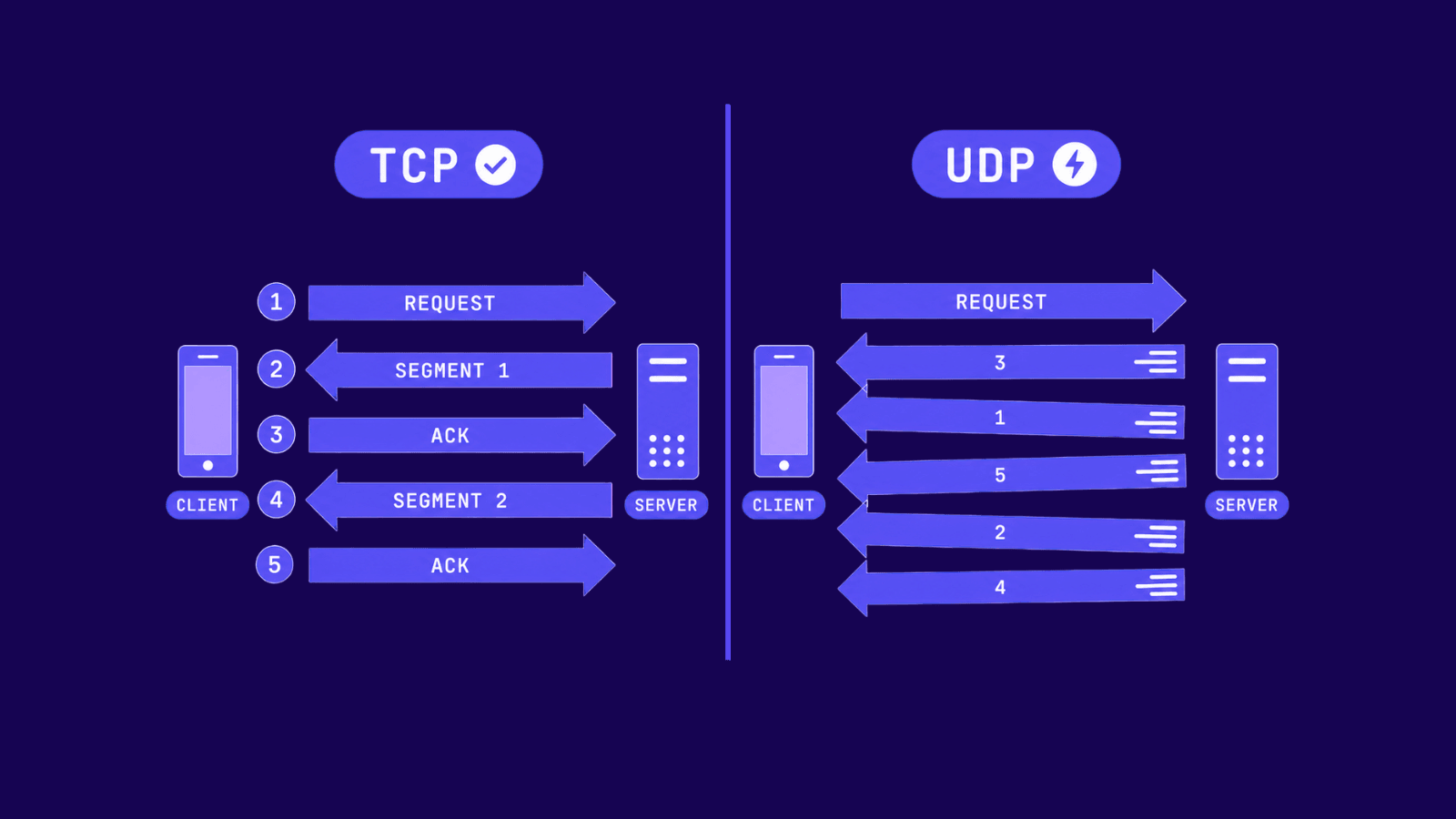
| Feature | TCP | UDP |
|---|---|---|
| Connection | Handshake before data flows | No handshake, sends immediately |
| Reliability | Guaranteed delivery, retransmits lost packets, full checksum | Best effort, no retries, optional checksum |
| Order | Packets reassembled in sequence | Packets arrive in whatever order they land |
| Speed | Slower, waits for acknowledgments | Faster, minimal processing |
| Header size | 20+ bytes | 8 bytes |
| Common uses | Web, email, file transfer, APIs | Gaming, VoIP, streaming, DNS |
| Proxy support | HTTP and SOCKS proxies | SOCKS5 or specialized relay |
When to Use TCP vs UDP
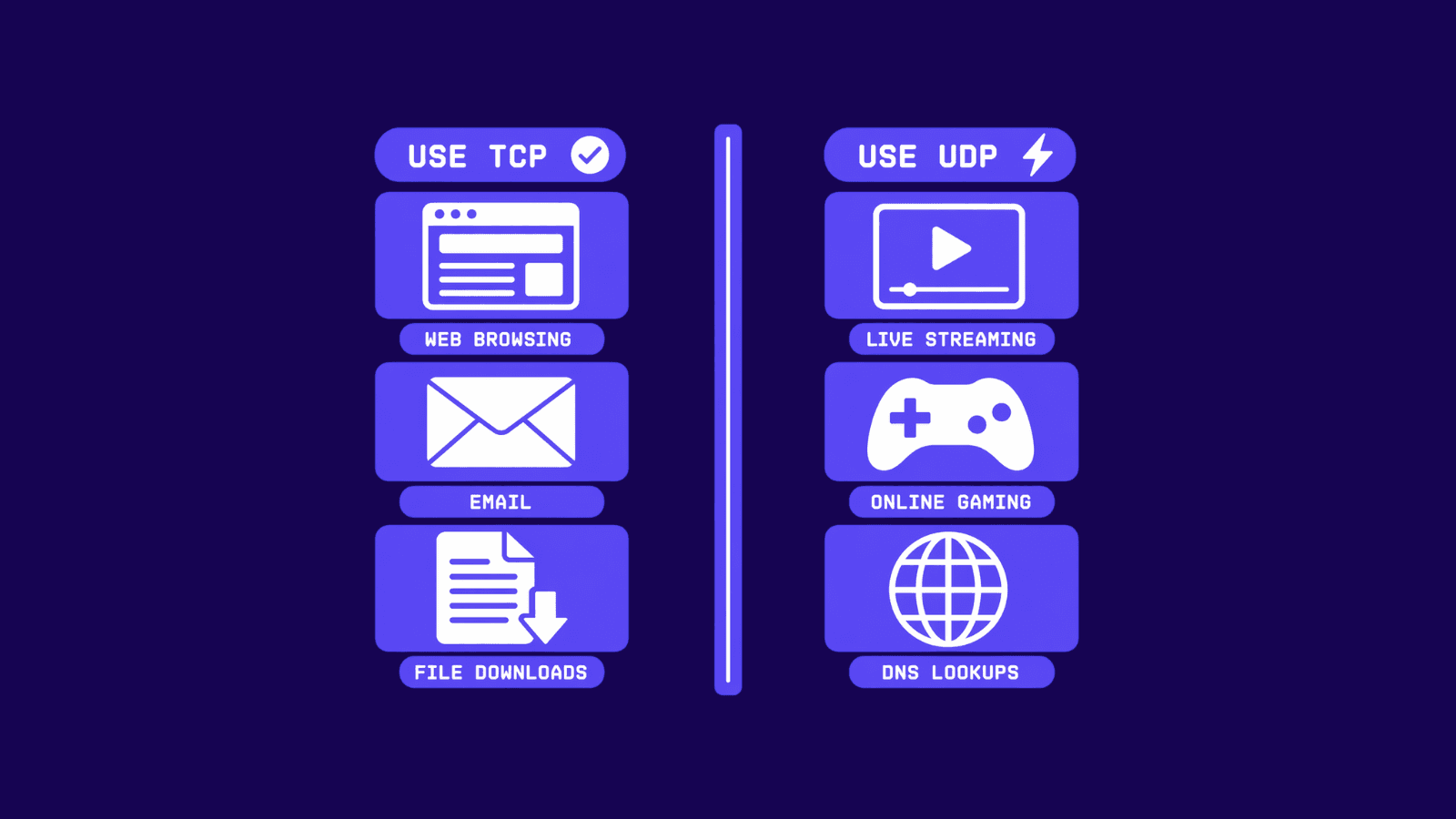
Pick TCP for anything where missing or out-of-order data breaks the result. For example, loading a webpage, downloading a file, signing in, sending email, hitting an API, all of these need a TCP connection. The handshake can add a bit of delay at the start, but after that you can stop worrying about whether the bytes made it.
Now, you can consider UDP as the right call when a delay to fix a problem is worse than the problem itself. It happens usually on games, video calls, voice or even live streams. Losing a frame or a syllable is barely noticeable. A two second freeze while something gets retransmitted is not.
DNS is also a useful example because it does not commit to one or the other. Most lookups go over UDP since the request and the answer are small and the round trip needs to be quick. If the response gets too large to fit, DNS retries the query over TCP.
HTTP/1.1 and HTTP/2 run on TCP, which is what most people mean when they say "web traffic uses TCP." HTTP/3 changed that. It runs on QUIC, and QUIC runs on UDP. The amount of HTTP traffic that is technically UDP underneath has been growing for a few years now.
How TCP and UDP affect proxy choice
Your proxy choice has to match the transport your traffic actually uses. That is why TCP versus UDP is not just a networking detail.
HTTP proxies only deal with HTTP and HTTPS traffic, and that traffic always runs over TCP. Because they read requests and responses directly, they can do useful things at that layer, like caching responses or modifying headers. The flip side is that anything outside HTTP is invisible to them. A non-HTTP TCP service will not work through one, and UDP cannot pass through at all.
SOCKS5 proxies work differently. They forward traffic at a lower level without inspecting what is inside it. Any TCP connection runs through them, and they also support a UDP relay mode, which is what makes them the option for things like DNS, voice and video calls, and online games.
For a closer look at how each one actually behaves in practice, there's a full breakdown over in our HTTP vs SOCKS proxies guide.
Wrap up
As you've learned in this article, the choice between TCP and UDP is mostly a question of what breaks first when something goes wrong. With TCP, latency goes up but the data is correct. With UDP, the data may be incomplete but the stream keeps moving. Most of what people do on the web sits in the first category. Most real-time traffic sits in the second.
The same logic applies to proxies. Based on what you’re using within your application, identify the proxy that will support it. In case you are uncertain about the specific type of proxy you need to use, you can contact our support team and they will assist you.
Frequently asked questions
Frequently Asked Questions
Is UDP faster than TCP?
Yes, but the speed is not coming from the wire. Bytes travel at the same rate either way. UDP feels faster because it skips the setup phase and does not stop to confirm that anything arrived, which removes most of the round trips that slow TCP down on short interactions.
Can a single application use both TCP and UDP?
Most do. A video call app is a good example. The audio and video stream itself runs over UDP because dropped packets matter less than smooth playback. Login, chat messages, and file transfers in the same app run over TCP, where losing data is not acceptable.
Is UDP less secure than TCP?
Neither one is secure on its own. TCP does not encrypt anything either. The encryption you are used to comes from TLS, which runs on top of TCP for HTTPS, or from DTLS and QUIC, which run on top of UDP. Whether your traffic is protected has nothing to do with which transport you use and everything to do with what is layered above it.
Does a firewall block UDP?
Some networks block UDP or restrict it to specific ports. UDP has no connection state, so it is harder for firewalls to track, and stricter environments tend to be cautious with it. This is why a lot of games and VoIP applications include a TCP fallback path. When UDP is being filtered, they switch over rather than fail outright.
Is TCP outdated?
No. The vast majority of internet traffic still runs on TCP, and that includes SSH, email, databases, and almost every API in production. QUIC is replacing TCP for web traffic specifically, but outside the browser, TCP is still the default and nothing else is positioned to displace it.
Should I worry about TCP vs UDP when picking a proxy?
Only if your traffic is UDP. Standard HTTP and HTTPS proxies cover TCP, which is what scraping, browsing, and API work need. For game traffic, VoIP, or anything that uses UDP as its transport, you need a SOCKS5 proxy, since that is the one that handles UDP relay.

