How to Browse Anonymously: The Top 2 Best Solutions
In this article, I'll show you the best two ways to remain completely anonymous online—residential proxies and WireGuard VPN.
Valentin Ghita
Technical Writer, Marketing, Research
Mihalcea Romeo
Co-Founder, CTO
The internet is a wonderful tool that brings us together, teaches us, and entertains us. But amidst all its goodness, it's also a place where hackers, data collectors, and advertisers can snoop on your personal information. To avoid possible invasions of privacy, learning how to browse anonymously is important. Below, we will explore some of the hidden web threats and see two powerful ways of remaining anonymous—residential proxies and WireGuard VPN—find their key differences, and show you how to set them up.
The Hidden Dangers of the Internet
1. Data Harvesting
Many websites and apps collect detailed information on your browsing history and preferences. Although some argue that such data collection enhances user experiences, it can also feel invasive, as you’re not always sure who’s storing your information or how it’s being used.
2. Identity Theft
Lots of loopholes on the web sites are exploited by cybercriminals to take control of private information, for example, your money or personal information. This can lead to a huge financial loss, emotional trauma, and so much more.
3. Government Surveillance
Certain regions of the world have strict rules on web content. In those places, governments can track your online activities, which can destabilize privacy rights and limit free expression.
4. Public Wi-Fi
Browsing on a public Wi-Fi network at an airport or café is dangerous because data transmitted via public networks is typically not encrypted. Your information—passwords and login details—can be captured by hackers if you browse without proper security and all of your accounts can be stolen if you are not cautious.
How Can You Browse Anonymously
Did you ever notice how your online activity seems to follow you around, with sponsored content or strange recommendations popping up wherever you go? If you've read this far, you're probably thinking: how do I browse anonymously and protect my online privacy?
Fortunately, two excellent solutions can help—ISP proxies and WireGuard VPN. Both hide your true IP address but work differently depending on your specific needs.
Residential proxies give you real residential IP addresses, so your web traffic mimics normal home browsing. They are perfect if you need authenticity for activities like social media management, data scraping, or ad verification.
WireGuard VPN, on the other hand, secures your entire internet connection in a secure tunnel, so hackers, advertisers, and whoever else might be interested will be unable to monitor your activity. When privacy is a top priority, it is definetely a must.
Key Differences in a Nutshell
Technology and Setup
Residential proxies route your traffic through real residential IPs, so your activity on the internet will appear just like normal home-user traffic. WireGuard VPN, on the other hand, creates an encrypted tunnel between your device to a VPN server which can hide all of your traffic.
Single vs. Bulk Usage
If you need multiple IP addresses at the same time—like for social media management, ad verification, or bulk data scraping—residential proxies are more flexible since you can work with many IPs concurrently. WireGuard VPN is better choice when you are a small team or a single person who just needs privacy.
Visibility
Since residential proxies appear as legitimate home-user IPs, it's virtually impossible for websites to detect you're using them. This is particularly handy for businesses that need stealth, such as ad verification or fraud detection. WireGuard VPN does mask your real IP, but most sites can notice that you're using a VPN and they can flag and block your connection pretty easy.
How To set Up Residential Proxies
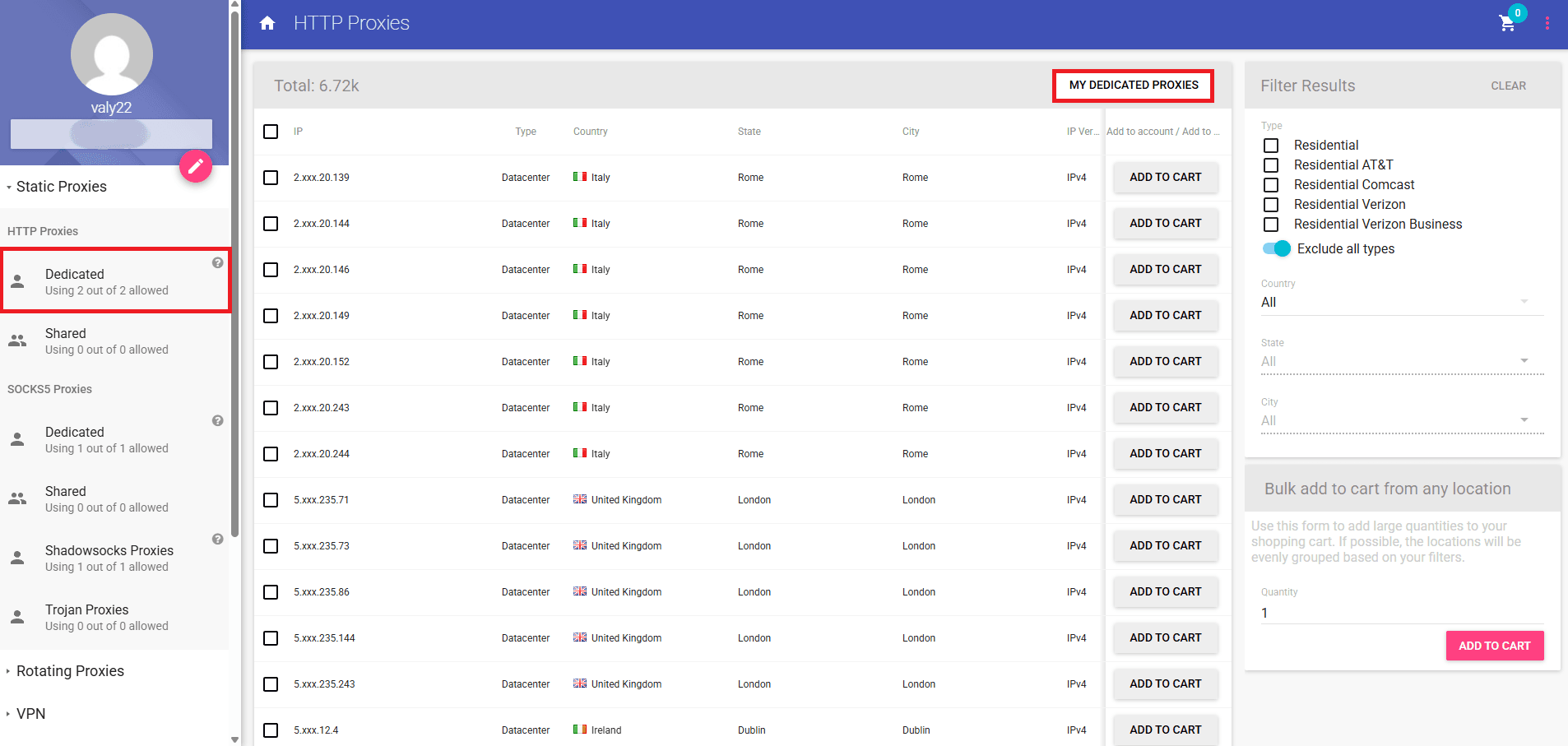
Step 1: Go to Your Purchased Proxies
For the beginning, be sure that you are logged into your Anonymous Proxies account and once you are in the dashboard, go to “My Dedicated Proxies”.
Step 2: Whitelist Your IP
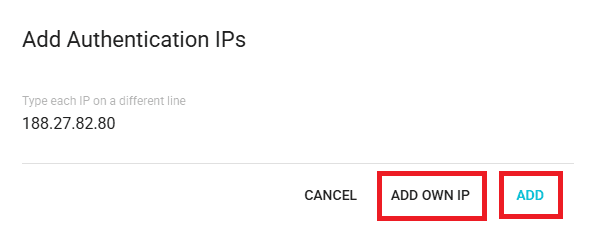
Once you can see your proxy details, you'll need to click on “Authentication IPs” and then on “ADD MORE”.

Here, you’ll need to add your IP by clicking on “ADD OWN IP” and then on “ADD”.
Step 3: Set Up Your Proxies
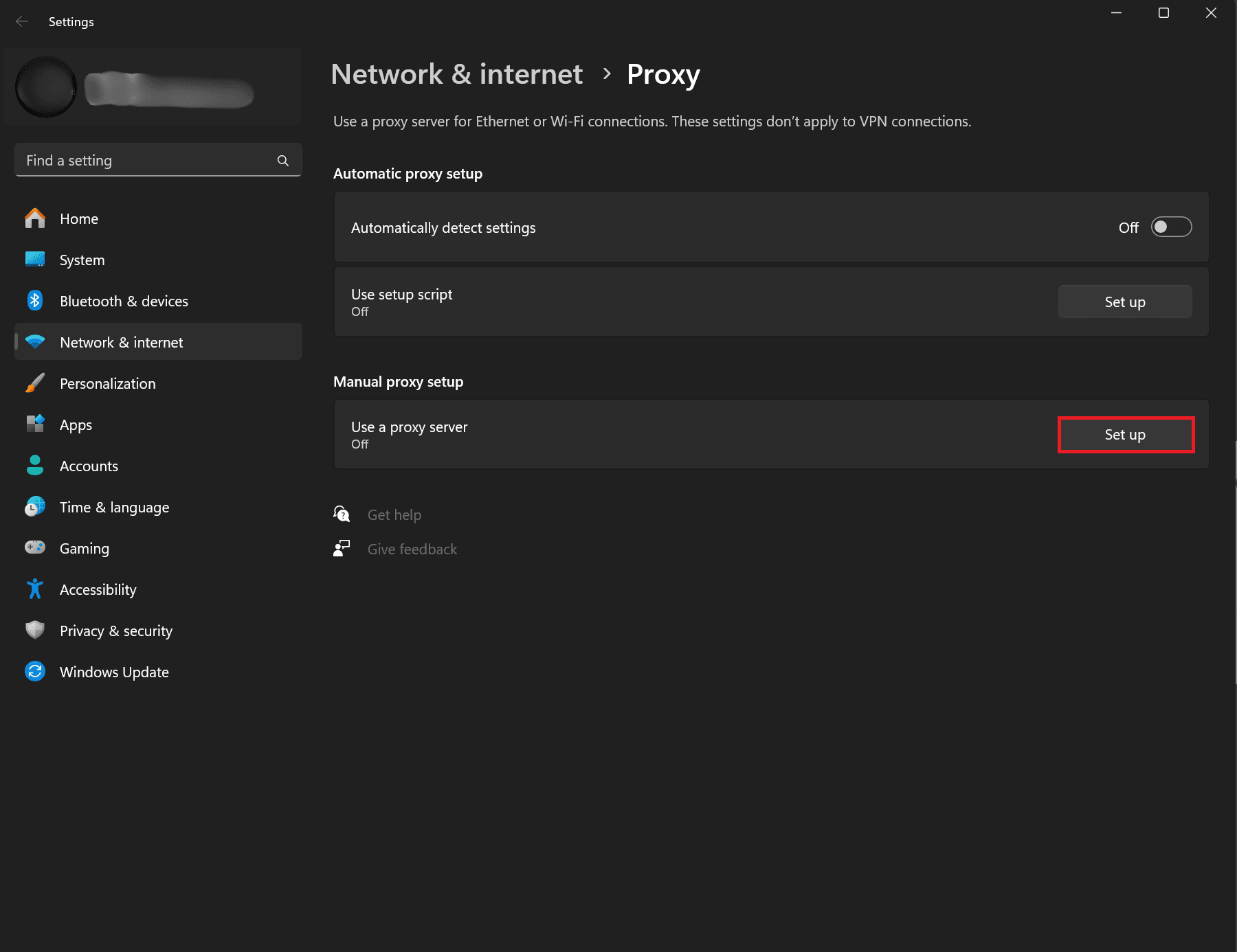
Once your IP is whitelisted, it’s time to set your proxy up. If you are on Windows, click on the search bar and and search for “proxy”, then select “Proxy settings”. On the “Proxy settings” page, you'll need to click on "Set up" button.
Step 4: Add Proxy Details
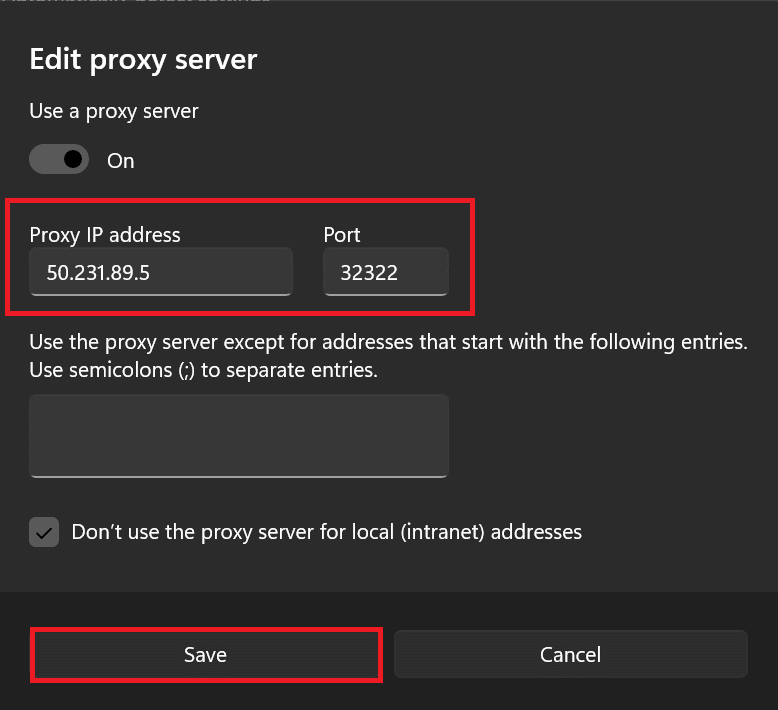
Before you add your proxy details, enable “Use a proxy server”, then enter the IP and port of the proxy you purchased. Click “Save” to confirm your configuration and then you are ready to go.
How To set WireGuard VPN
Before we start, you'll need to download the WireGuard app suited for your system.
Step 1: Go to Your WireGuard IPs
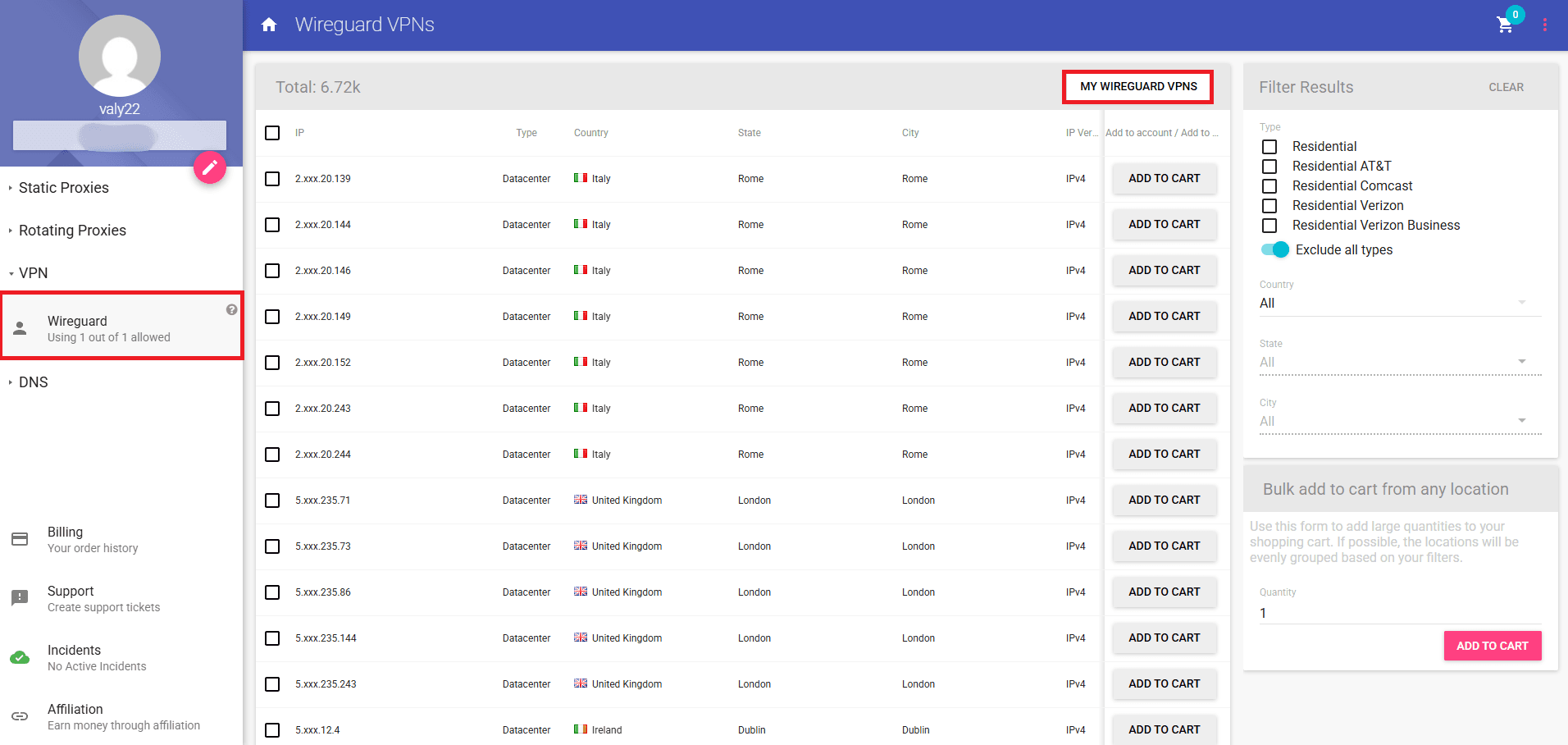
Once you install it, log in to your Anonymous Proxies account and go to your purchased WireGuard IPs.
Step 2: Download Config
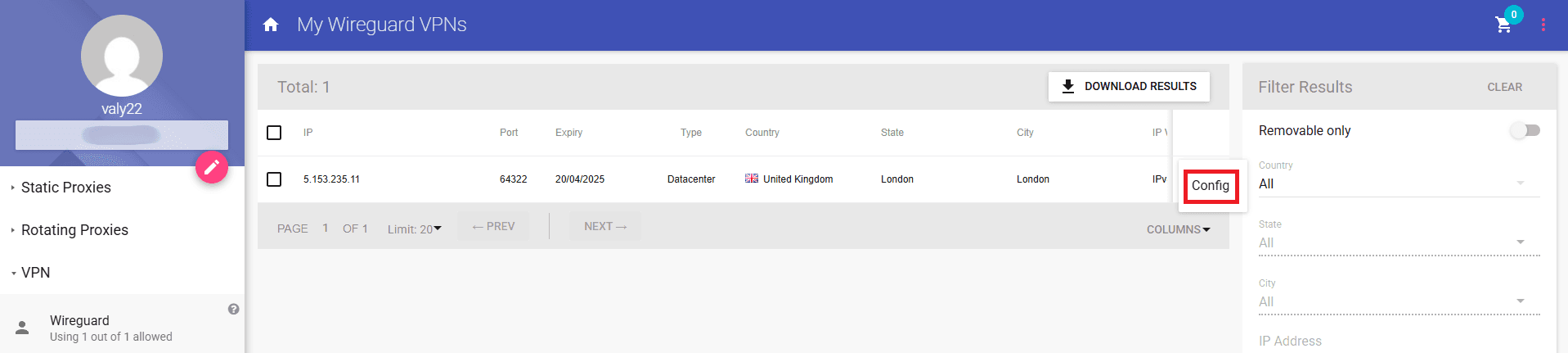
Once you can see your WireGuard IPs, you'll see 3 dots, be sure that you click on them and then on the config button.
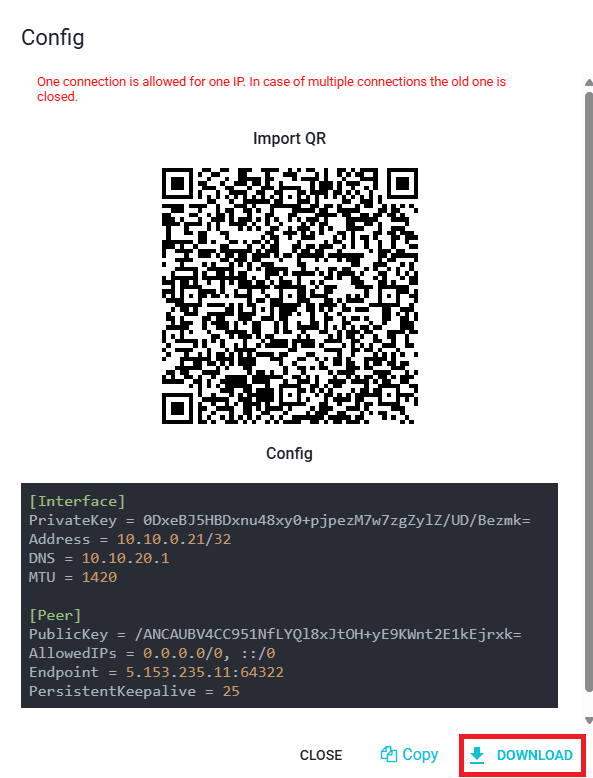
A new window will appear, showing your configuration details. The top portion includes a QR code, which you can scan if you’re using WireGuard on a mobile device. The second portion shows the text-based config, which you can download as a .conf file or copy into a text file with a .conf extension. For this example, we'll download the .conf file.
Step 3: Add Tunnel
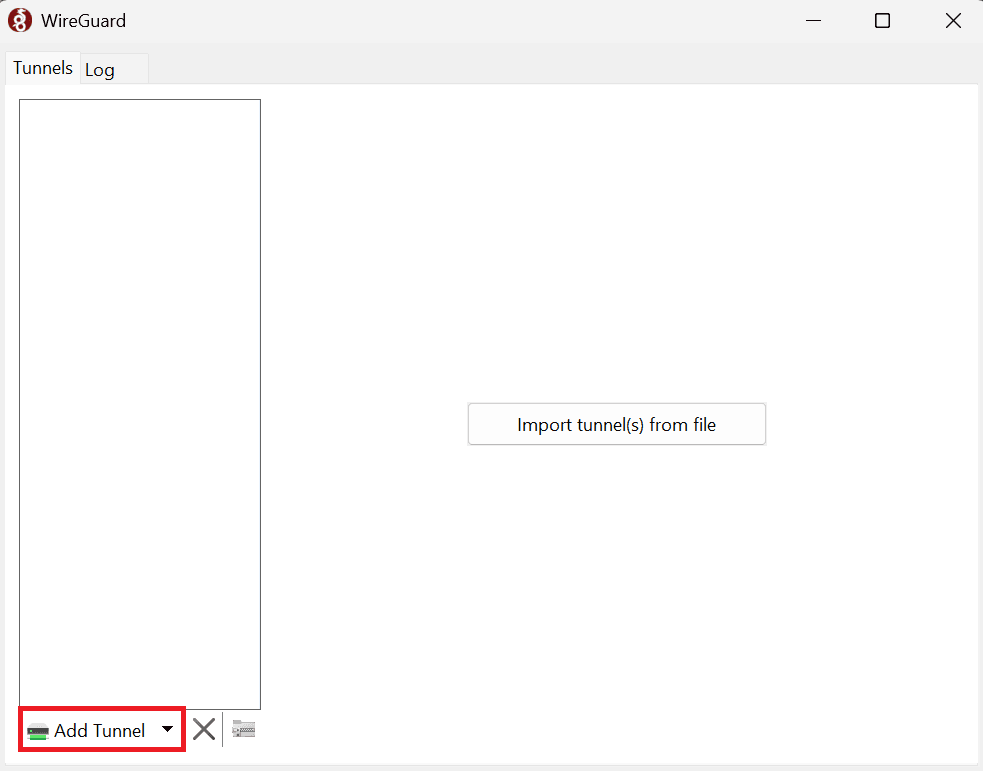
After you download your .conf file, open WireGuard and click on “Add Tunnel” button to add the .conf file you just saved.
Step 4: Activate Your WireGuard VPN
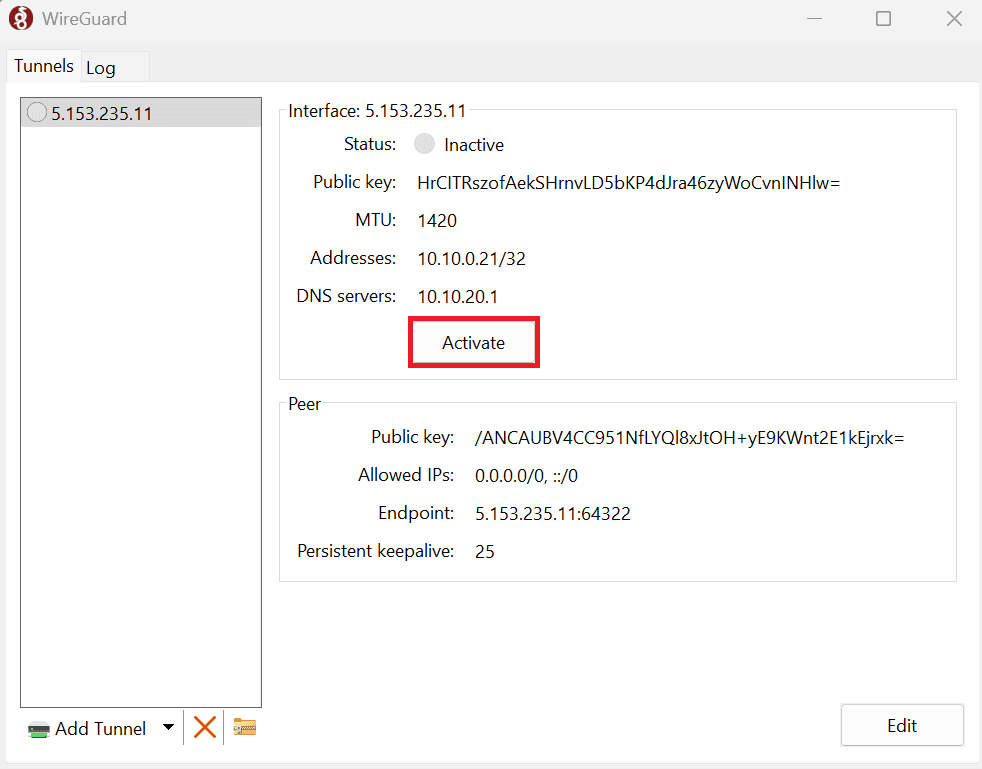
Now, all what remains to do is to click on the “Activate” and after a few seconds, all your internet traffic will be routed through the WireGuard VPN.
Conclusion
Lots of online risks, ranging from identity theft to government surveillance, make you think twice to remain more anonymous while you browse the web. And as you've seen, residential proxies or WireGuard VPN are 2 very good choices to remain under the radar.
Now, if you have questions regarding how to set set up your proxies or VPNs, or want to know more about other proxy solutions we have, don’t hesitate to contact our support team. And if you’re curious about the importance of IP addresses, then feel free to read What Is an IP Address?.

Buy Backconnect Proxies
Rotating IPs on every request. Scale scraping and automation without manual IP management.