Cloudflare Error 1010: Why You Got Blocked and How to Fix It
Seeing Cloudflare Error 1010 can feel random, but most of the time it is simply a site’s protection working as intended and blocking requests that look suspicious. The real challenge is figuring out what triggered it, whether that is your browser settings, your network or IP, or a specific security rule on the website. In this article, you will learn what Cloudflare Error 1010 means, the most frequent triggers, and the fastest fixes for both visitors and administrators.
Valentin Ghita
Technical Writer, Marketing, Research
Mihalcea Romeo
Co-Founder, CTO
What Is Cloudflare Error 1010?
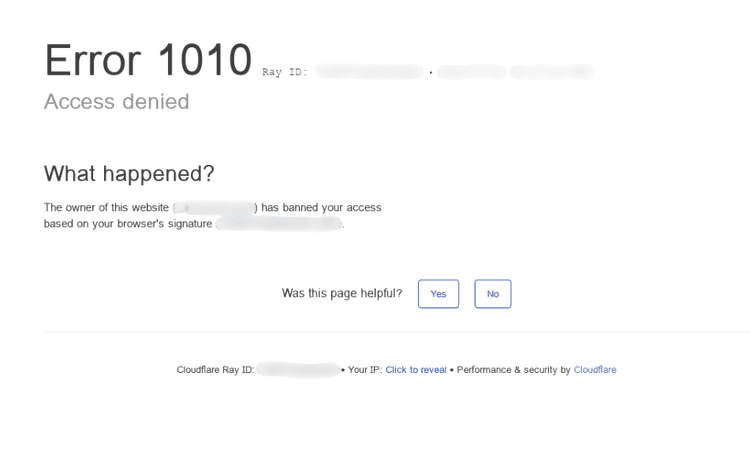
Cloudflare Error 1010 is a security block that means the website you are trying to visit has decided your request looks unsafe or unusual. In many cases, the block message mentions something like “access denied” or “banned based on your browser’s signature.” That phrase is important because it hints that the site’s protection rules are reacting to the way your browser, device, or network “looks” to Cloudflare.
Think of it like this: Cloudflare sits in front of a website as a shield. If the shield sees traffic patterns that resemble bots, scrapers, or abusive behavior, it can deny the request automatically. The website owner controls how strict those rules are, so Error 1010 often shows up when a security setting is configured a bit too aggressively, or when your browsing setup accidentally resembles automated traffic.
Why Cloudflare Triggers Error 1010: The Most Frequent Reasons
Cloudflare does not usually block people “just because.” Error 1010 shows up when your visit gives off signals that look risky or automated, even if you are a real person trying to open a normal page.
One common trigger is browser add-ons. Ad blockers, script blockers, privacy extensions, and anti-fingerprint tools can quietly change how your browser talks to a site. If they block key scripts, strip headers, or prevent cookies from being set, the request can start to look suspicious from a security point of view.
Another frequent cause is having JavaScript or cookies disabled, or partially blocked. Many sites use those basics to confirm you passed a quick check and to keep your session consistent. If your browser cannot complete that process, Cloudflare may deny access instead of letting you through.
Network choice also matters. VPNs and proxies route your traffic through shared exit IPs. If other users on that same IP have been scraping, spamming, or triggering rate limits, that address can develop a bad reputation, and you may get blocked simply for being on it.
Sometimes it is not you at all. Website owners can set strict firewall rules, block broad regions or networks, or keep emergency protections enabled long after an attack. Even normal behavior, like rapid refreshing or opening many tabs can trigger blocks.
How to Identify the Real Cause of Error 1010
Error 1010 is annoying because nothing looks “broken.” The site is up, but it’s basically saying: “Nope, not from your setup.” Most of the time it’s triggered by either: something in your browser like extensions, cookies, strict privacy settings, or something about your connection, for example maybe a VPN or proxy, your IP reputation or network rules. However, here’s exactly how to narrow it down in a couple minutes.
Browser extensions and privacy settings are the top cause
Ad blockers, script blockers, anti-tracking tools, or strict cookie rules can prevent required scripts from running and make your browser look suspicious. Test: try a private window, then disable extensions and reload; if it works, re-enable one by one and whitelist the site once you find the culprit.
Your IP can be blocked even if you did nothing wrong
Shared or recycled IPs (public Wi-Fi, offices, some ISPs) can inherit a bad reputation and get blocked. Test: open the site on mobile data or a different Wi-Fi; if that works, your current IP or network is the issue.
VPNs and proxies frequently get flagged
Exit IPs are shared by many users, so one abused node can cause blocks for everyone. Test: fully turn off the VPN or proxy (including any browser extension) and refresh; if it works, switch locations or use a cleaner, less shared option.
Network filters and firewalls can trip bot protection
Work and school networks may route traffic through gateways, DNS filters, or firewalls that alter requests. So if the site works elsewhere but never on this network, use another connection or ask the admin to allow the site.
Admin Fixes for Cloudflare Error 1010
If your visitors are seeing Error 1010, Cloudflare is blocking them because your current protection settings think their browser or request “looks wrong.” The fix is usually small tuning, not removing security.
First, check the settings that most often cause false positives. In your Cloudflare dashboard, look at your overall Security Level and Browser Integrity Check. If you run these aggressively, normal users can get flagged for using privacy extensions, strict browsers, or VPN connections. Make one change at a time: lower the Security Level slightly or temporarily disable Browser Integrity Check, then retest with the same visitor setup.
Next, audit your Firewall Rules and any rate limiting. Rules can become outdated or too broad over time, especially country blocks, ASN blocks, or custom expressions. A single overreaching rule can lock out legitimate users, travelers, or even entire partner networks. Rate limiting can also trigger problems if it punishes people who refresh often or load many assets quickly.
If you know certain traffic should always be allowed, create targeted allow rules. Whitelist trusted IP ranges (partners, offices), verified monitoring services or specific endpoints that must stay accessible.
Also, for larger sites, consider using the Cloudflare API to maintain allowlists and update rules automatically based on real traffic patterns. After each change, monitor analytics and logs so you keep a healthy balance: fewer blocks, same protection.
User Fixes for Cloudflare Error 1010
Cloudflare Error 1010 usually means the website’s security system rejected your request based on signals from your browser or connection. The safest fix is to make your setup look “normal” again.
In the beginning you should start simple, for example, refresh the page, wait a couple minutes, and try again. Sometimes a temporary spike or an overly strict rule mislabels you briefly.
If it keeps happening, open the site in a private/incognito window and disable extensions like ad blockers, privacy tools, and script managers. These can block JavaScript or change browser behavior in ways that security checks dislike.
Next, clear cookies and cache for that specific site (not your whole browser) to force a fresh session, then restart your browser and try again.
If you’re using a VPN or proxy, turn it off completely (including any browser add-on) and retry. Shared or flagged IPs are a common reason legitimate users get blocked, even if you did nothing wrong. If you must use an alternate IP, this is where ISP proxies or mobile proxies are always a good choice, since their IPs come from real consumer or carrier networks, which usually look more “normal” and tend to be more reliable than datacenter IPs that get flagged more often.
To confirm whether it’s your network, test on mobile data or another Wi-Fi. Also try a different browser or device to separate browser fingerprint issues from IP reputation problems.
If none of that works, the block is almost always coming from the site owner’s Cloudflare settings. At that point, your best move is to contact the website and share the time of the error plus any reference ID shown on the block page.
Final thoughts
As you've seen above, Cloudflare Error 1010 usually means the site expected normal visitor behavior, but your browser or IP did not match. As a user, simplifying things often helps, such as a clean session, fewer extensions, and trying another network or IP. As an admin, the best fix is tuning rules rather than removing protection, so real people get through while abuse stays blocked.

Buy ISP Proxies
Dedicated IPs from real ISPs. Residential trust, datacenter speed, unlimited bandwidth.