Best Proxy Options for Web Scrapers in 2025: Full Guide
If you scraped the web long enough, you must've encountered IP bans and endless CAPTCHA loops, but don't worry, it happened to the best of us. However, if you combine a proxy with your scraper, you can make your scraper look natural and also avoid these annoying blocks. The trick stays in choosing the right one. In this guide, we will take a closer look at why proxies are important in web scraping, when a type of proxy will excel, and how you can select the correct one.
Valentin Ghita
Technical Writer, Marketing, Research
Mihalcea Romeo
Co-Founder, CTO
Why Use Proxies for Web Scraping?
When you web scrape some websites which have put in place strict anti-bot measures from only a single IP, sooner or later, you will still trigger their defense systems. These blocks can either be CAPTCHAs, rate limits, or even IP bans. However, with the help of a web scraping proxy which stands between your scraper and the website you want to scrape, you can route your traffic through multiple IP addresses and this can help you look like a real user which is just casually browsing. That simple change will help you reduce blocks, reduce strict rate limits, and lowers the number of CAPTCHAs that would otherwise stop your scraper.
Comparing Proxy Types for Web Scraping
- Residential proxies. These route traffic through real consumer connections. They blend in well, which is why they are the go to choice for stricter targets and geo specific tasks. They usually cost more and can be slower than data center options.
- Datacenter proxies. Fast, affordable, and perfect for lighter targets, API like endpoints, or bulk crawling where speed matters. Since the IPs live in known data centers they are easier for tough sites to flag.
- ISP (or static residential proxies). Residential IPs hosted in data centers. You get the trust of residential with the stability of a fixed IP. Great for carts, dashboards, and any workflow that benefits from a single identity over time.
- Mobile proxies. Traffic exits through carrier networks. These are the most forgiving on detection but also the most expensive. Use them when nothing else gets through or when you absolutely need peak trust signals.
- Backconnect proxies. Rotating residential or datacenter proxies, they are very popular in the scraping world and usually a right choice in most cases.
- Public free proxies. They are tempting, but very risky. They are often slow, unstable, or unsafe. For anything serious, skip them.
Besides the types we talked above, you can decide how your IPs behave over time. With our rotating residential proxies you can change the IP on each request or at a fixed interval, which is often the best approach when you engage in activities like crawling or scraping. These proxies also have the option for keeping a sticky session, which lets you hold the same IP for minutes or hours, and they are a must when you need a stable identity in your online activities.
How to Choose the Best Proxy for Scraping
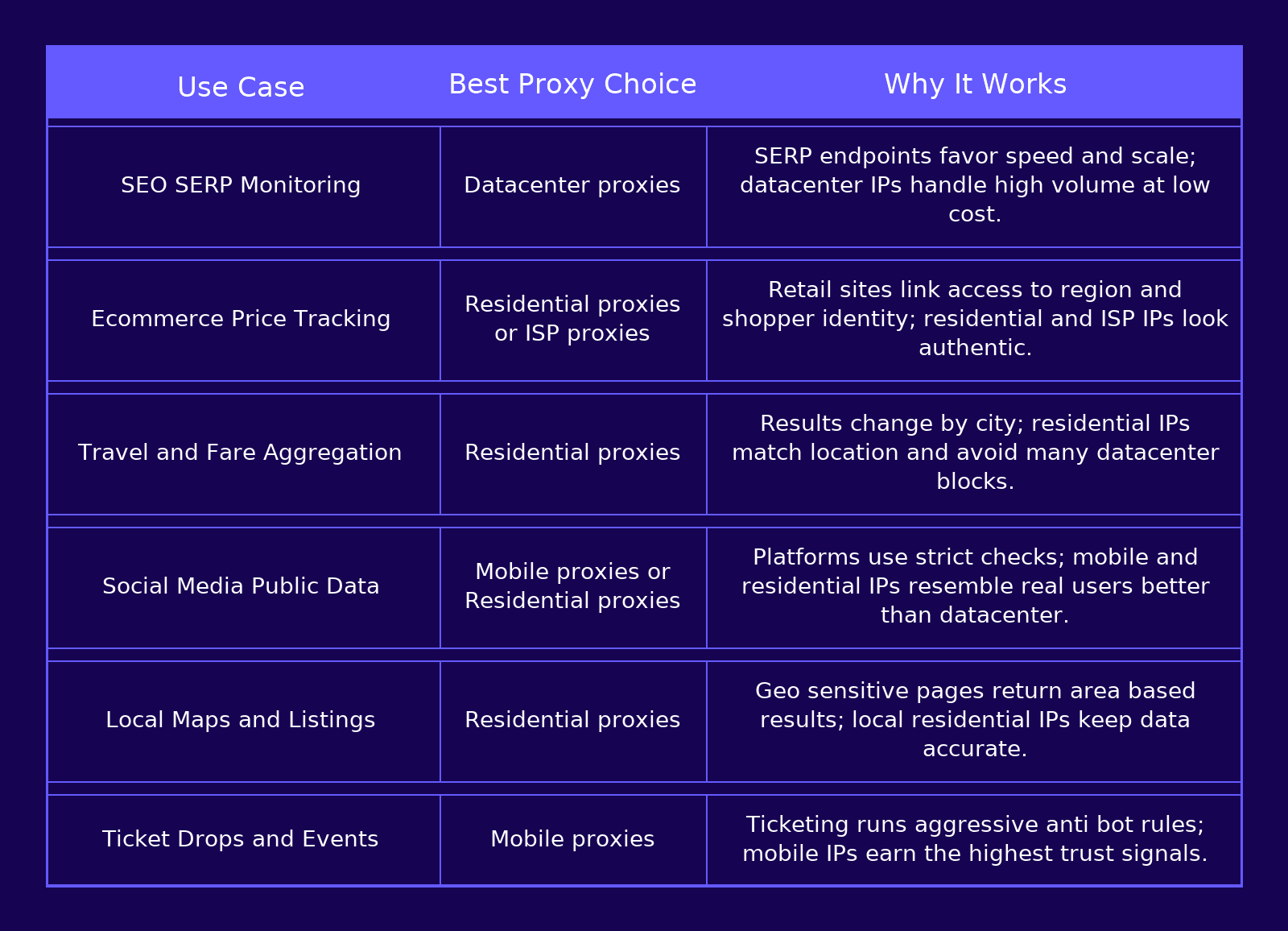
Pick the Right Proxy for Each Scraping Job
Different scraping scenarios call for different proxy setups. Use the table below to match common jobs with the best proxy choice.
Choosing the Best Provider
Once you have the right proxy type in mind, the next step is picking a provider you can trust. Be cautious with free proxy services. They tend to be crowded and slow, and they often miss the features that matter for scraping: steady uptime, precise geolocation, predictable scaling, and low response times. Paid networks can invest in solid infrastructure and monitoring, which usually leads to higher success rates and fewer fire drills. That said, quality still varies, so start small. Run a short test on a defined workload, measure success rate and cost per page, then scale if the numbers look good.
At Anonymous Proxies, we keep it simple and performance first. You get fast routes, access to dedicated IPs when you need a stable identity, an easy setup, fair pricing, and real 24/7 support from people who understand scraping.
No Code Scrapers with Built In Proxies
Visual tools that favor speed to value. They often include built in rotation or easy proxy toggles.
- Octoparse. Point and click extraction with templates for common sites and optional IP rotation.
- ParseHub. Desktop app for building workflows on dynamic pages without writing code.
- Web Scraper browser extension. Sitemap based extraction in Chrome or Firefox with cloud options for scheduling.
These options are friendly to non developers. If you prefer to avoid code or your project is time sensitive, they can be a quick win.
Open Source Scrapers with Proxy Support
If you're looking for control and a very clean setup, open source scrapers allow you to provide your own proxies and customize how each request behaves. Scrapy, Playwright, Puppeteer, and Selenium all allow you to plug proxies when needed. You just need to add your proxy details in the required parameters. With each scraping library you are able to set proxies per request or for the entire session, rotate addresses if needed, and manage retries in code.
Scraper APIs that Handle Proxies
Sometimes you just want results fast without running browsers or juggling IPs. Scraper APIs give you an endpoint that returns HTML or structured data while they handle proxy rotation, rendering, retries, and common blocks. They are very useful when you do not want to manage infrastructure, when targets are heavy on anti bot checks, when you need country targeting, or when your in house crawler needs a reliable fallback during spikes.
A popular pick would be ScraperAPI, which offers automatic proxy rotation, and country targeting, so you can request data from specific regions with less setup.
Another strong option is Zyte API, since it is an all in one service with smart proxy management, browser rendering and automated unblocking designed for dynamic sites.
Web Scraping Pitfalls and Quick Fixes
Blocks and 403s. Slow the crawl, add small random pauses, use rotating residential proxies or even mobile proxies if you need the highest authenticity for your scraping mission, and send realistic headers with changing user agents.
CAPTCHAs. Use a real browser when needed, rotate IPs more often, and vary timing, scrolls, and viewport size so traffic looks human.
Dynamic content that never appears. Load pages with Playwright or Puppeteer, wait for solid selectors instead of fixed timeouts, and retry on network hiccups.
IP bans. It can happen when your address or subnet gets flagged. All you need to do, is to switch to residential or ISP pools, rotate your IPs, and warm your new IPs with low volume first.
Conclusion
Now, you should have an idea of what type of proxy is right for your web scrapers, and when to switch. Use datacenters for speed, residential for sites that are tougher, ISP proxies for long steady sessions, and mobile when you need the highest trust.
If you need help integrating your scraper with our proxies, feel free to contact our support team and we will get you up and going.

Buy Backconnect Proxies
Rotating IPs on every request. Scale scraping and automation without manual IP management.