VPS vs Proxy: What’s the Difference and Which One to Use?
If you’re looking at VPS vs Proxy, the real question is simple: do you need a server you can control, or do you need a better way to manage how your traffic reaches the web? While they can seem similar at first, they do very different things. A VPS is built for hosting and running software, while a proxy is built for routing traffic through a different IP. In this article, we’ll break down the difference, when each one makes sense, and when using both together is the better choice.
Valentin Ghita
Technical Writer, Marketing, Research
Mihalcea Romeo
Co-Founder, CTO
What Is a VPS?
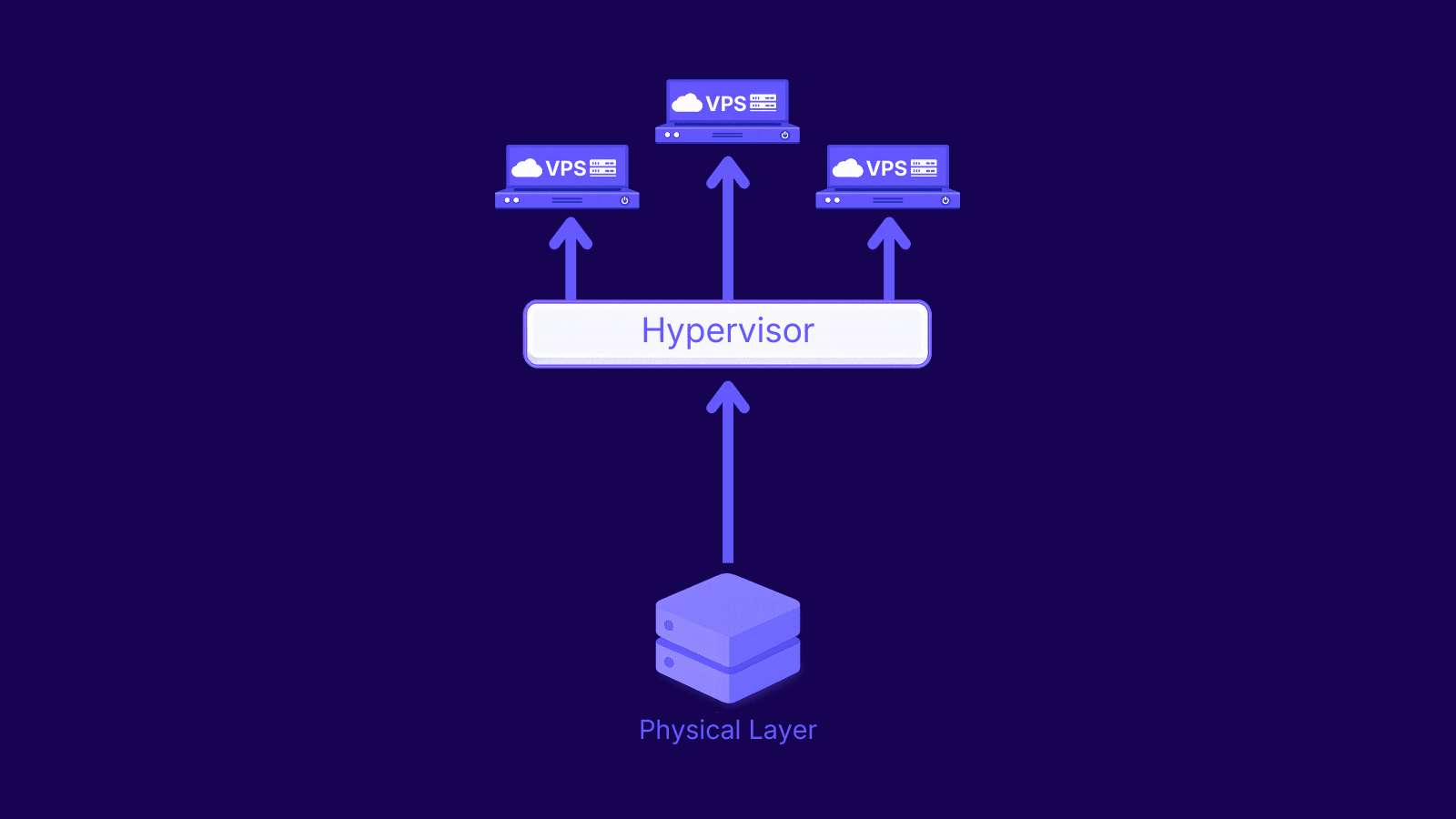
A VPS, or Virtual Private Server, is a private server space created inside a larger physical server. Even though the hardware is shared, your VPS works like its own machine. You get your own operating system, your own resources, and your own settings. You can log in, install software, change configurations, and manage it much like you would with a dedicated server.
A simple way to picture it is this: a VPS gives you your own private space inside a much bigger system. You are not renting the whole physical machine, but you still get a solid level of control and independence, and that's exactly why it is more flexible than basic hosting.
What Is a Proxy?
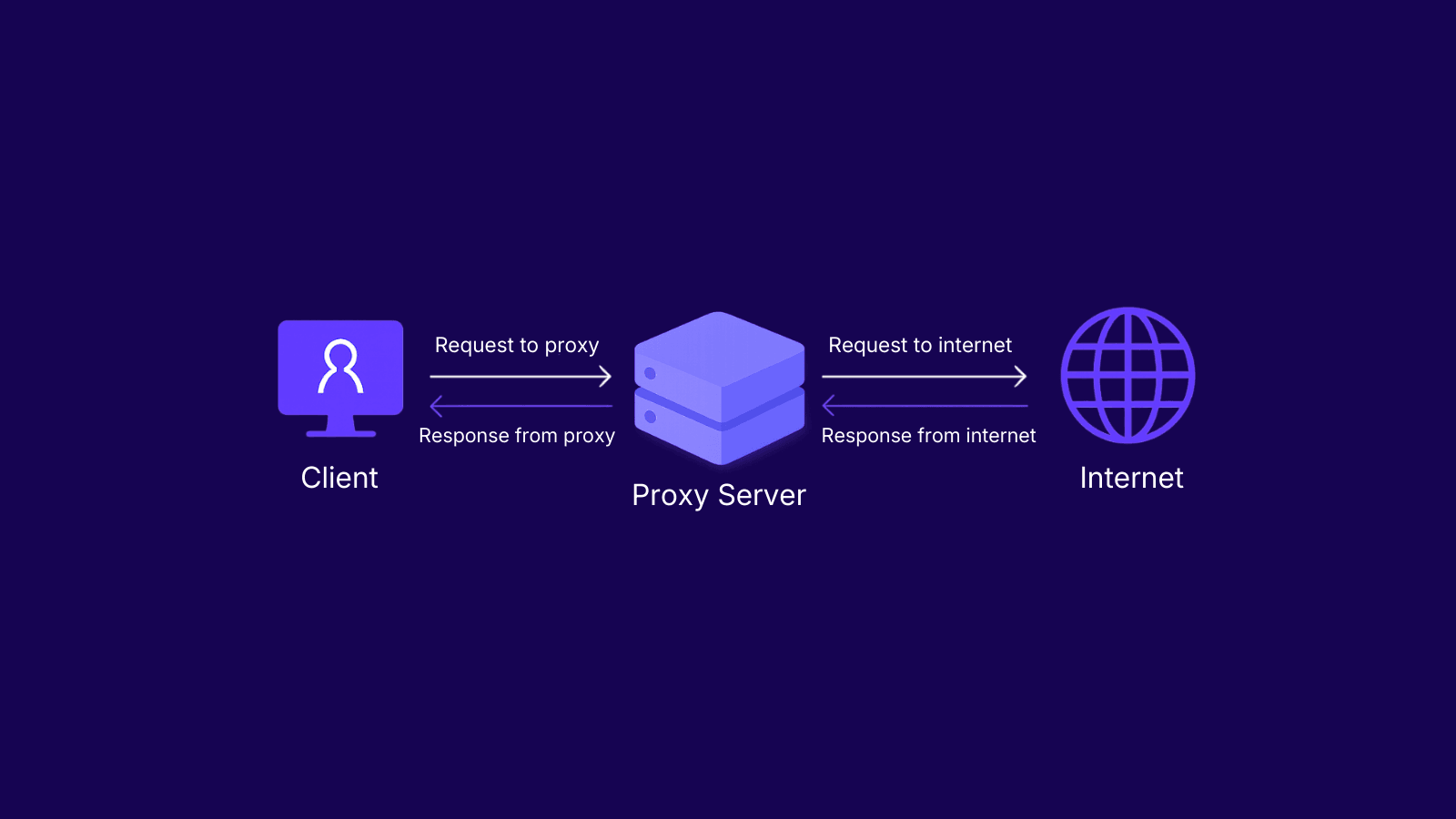
A proxy is simply a middleman between you and the website or online service you want to reach. Basically, your request won't go straight to the destination and it will first go through the proxy, which will send it on your behalf. And, because of that, the destination will the proxy’s IP address rather than your own, so your IP will remain hidden from any websites you visit.
VPS vs Proxy: Main Differences
If you want the quick answer first, below is a simple and clear table that shows the main differences between a VPS and a proxy server.
| Feature | VPS | Proxy |
|---|---|---|
| Main purpose | Run software, host apps, manage a server environment | Route traffic through another IP |
| Level of control | Full server control | Limited to traffic and request handling |
| Best for | Hosting, development, server-side tasks | Scraping, geo-targeting, privacy, IP management |
| IP flexibility | Usually limited | Much higher |
| Setup | More technical and hands-on | Usually faster to deploy |
| Maintenance | You manage the server yourself | Provider handles most of the backend |
| Scalability | Good for compute resources | Better for scaling traffic across multiple IPs |
| Cost structure | Based on server resources | Based on IPs, bandwidth, or access type |
| Residential support | No | Yes |
| Datacenter support | Not the same use case | Yes |
| Built for IP rotation | No | Yes, depending on the proxy type |
At a basic level, the difference is simple. A VPS gives you a server you can control, while a proxy gives you a way to send traffic through a different IP.
That difference shapes how each one is used. A VPS is usually the better choice when you need to run software, host services, or manage a setup over time. A proxy is usually the better choice when what matters most is how your requests reach a website.
They also scale in different ways. A VPS can give you more CPU, RAM, and storage as your workload grows, but it is not built for IP flexibility. A proxy service is. If you need different IPs, different locations, or rotating IP traffic, proxies are much easier to work with than trying to build the same kind of setup through a single VPS.
When a VPS Makes More Sense
A VPS is a better fit when you need a reliable place to run something over time. That could be a website, a backend service, a private dashboard, or a development setup you want to access whenever you need it.
It also makes sense for tasks that depend more on processing power than on IP variety. If you are running scripts on a schedule, storing files, testing applications, or managing internal tools, a VPS gives you a stable environment you can fully control.
Put simply, if your project needs its own machine-like space where everything runs the way you set it up, a VPS is usually the right choice.
When a Proxy Makes More Sense
Now, a proxy makes more sense if the way your traffic looks online is part of the job. This includes jobs like scraping, automation, ad verification, market research, localized testing, and handling multiple accounts.
For instance, you might want to view search results from another country, view how a website looks in a specific region, collect data from many web pages, or simply want to avoid sending requests to the target website from the same IP.
That’s exactly why proxies are often a better variant for web-facing tasks. When the goal is not just to run a tool, but also to control how your requests reach the target site, proxies will always be the way to go.
Residential and Datacenter Proxies: Which Should You Choose?
Now if you think a proxy is what you need, the next thing to do is to pick the right kind. The biggest difference comes down to where the IPs come from. The main distinction is the origin of the IP. IPs used by residential proxies are those provided by internet services to internet users, whereas IPs used by datacenter proxies are those provided by servers located in data centers.
That difference matters more than it might seem. Websites do not treat every connection the same way. Residential proxies usually blend in better because they look more like normal user traffic. Datacenter proxies are different. They are often faster, easier to scale, and usually cost less, which makes them a strong fit for bigger workloads.
Here is a table that can help you take a quick decision.
| Proxy Type | Choose It When | Main Strength | Main Trade-Off |
|---|---|---|---|
| Residential Proxies | You need a more natural-looking connection or more precise location targeting | Lower block risk on stricter targets | Usually more expensive |
| Datacenter Proxies | You need speed, scale, and lower cost for larger workloads | Faster and easier to scale | More likely to be flagged on stricter sites |
Can You Use a VPS and Proxy Together?
Yes, and for many real-world setups, that is often the best way to do it.
A VPS can be the place where everything runs. You use it to host your scripts, tools, or applications. Then, instead of sending traffic straight from the VPS IP, you pass it through proxies. Thus, you retain total control over the virtual server while at the same time having the ability to change your IP address as you wish with the aid of a proxy.
Conclusion
As you've learned in this guide, a VPS and a proxy are built for different jobs. A VPS is the better choice when you need a server you can control, while a proxy makes more sense when IPs, location, privacy, or traffic routing matter more.
So, the right option depends on what you need to do. Now, if you’re not sure which one is better your use case, feel free to contact our support team. We’ll be happy to help.