Instagram Action Block: How Can You Overcome It in 2026?
Even if you’ve been on Instagram for years, an Instagram Action Block can still hit out of nowhere. You’re just doing your usual thing, liking a few posts, replying to DMs, maybe handling engagement for a business account, and suddenly Instagram won’t let you do anything. It feels glitchy, but most of the time it’s Instagram’s way of saying, “Something about this looks off.”
In this article, you’ll learn what an Instagram Action Block error is, how to identify the message you’re seeing, what triggers it, how to get around it, and how to prevent it from returning.
Valentin Ghita
Technical Writer, Marketing, Research
Mihalcea Romeo
Co-Founder, CTO
What Is an Instagram Action Block Error?
An Instagram Action Block is Instagram hitting pause on your account’s activity. It usually kicks in when something you’re doing matches patterns the platform associates with spam, automation or suspicious behavior. It doesn’t necessarily mean you did something “bad.” Think of it as Instagram saying, “Hold up, we need to make sure this is legit.” Once that trust check settles, your actions typically start working again.
The block can apply to different features depending on what triggered it. You might suddenly be unable to like, follow, comment or send DMs. In some cases, even profile edits, or actions like blocking and unblocking someone, can get limited. That’s why it feels so weird: Instagram still loads, Stories still play, and you can still scroll, but any action you try to take gets rejected.
As for timing, there’s no single countdown timer. Some blocks clear in a few hours, others take a couple of days, and if you keep pushing the same action over and over, you can accidentally extend it.
Instagram Action Blocked Error Types Explained
Instagram uses a few variations of the same restriction, and the wording (and whether you see a timer) tells you a lot about how long you might be stuck.
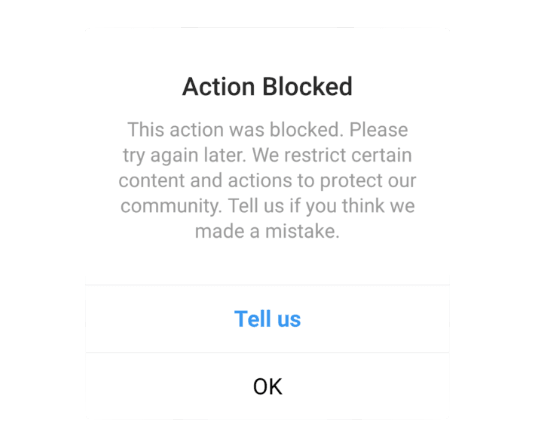
The first popup, “Action Blocked… This action was blocked. Please try again later”, is the classic version with no end time shown. It usually means Instagram is limiting one specific action because your recent behavior looked unusual. Since there’s no expiration date, the timing can vary. For many people it should clear within hours, but if you keep retrying or repeat the same pattern, it can extend for a longer period of time.
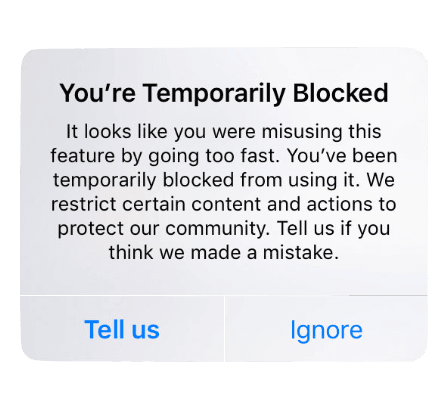
The “You’re Temporarily Blocked… you were misusing this feature by going too fast” message is Instagram being more direct about the trigger: speed. This one often resolves faster if you stop the behavior immediately, since it’s basically a cooldown for moving too aggressively.
Then you have the most “informative” version: “Try Again Later… This block will expire on [date]”. That’s the same general restriction, but Instagram is explicitly showing an end point. If you see a date, treat it as your best clue for timing, and avoid anything that could retrigger the block before it lifts.
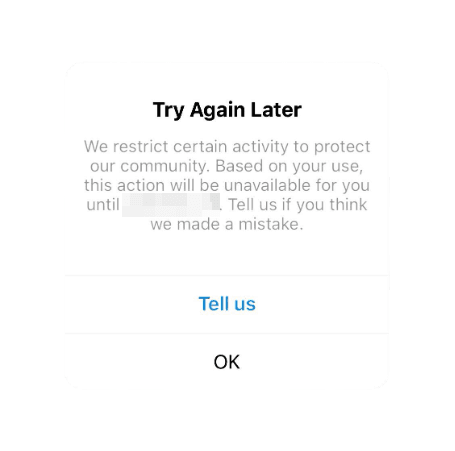
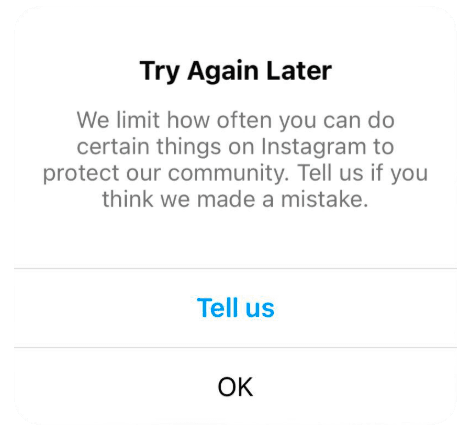
Finally, the other “Try Again Later… We restrict certain activity to protect our community” popup looks similar but has no timer. Same category, different certainty. No date usually means you need to cool off, stabilize, and wait it out instead of forcing actions.
Why Instagram Action Blocked Errors Happen?
You hit Instagram’s hidden rate limits
Instagram quietly limits how many likes, follows, comments, and DMs you can do within short time windows. There is no universal “safe number” because limits vary by account age, history, and how consistent your usual activity is.
Automation tools or risky connected apps
Auto-like, auto-follow, mass DM tools, and “growth services” can create bot-like patterns. Some apps also keep working in the background, so you might get blocked even when you are not actively using Instagram.
Repetitive behavior that looks like spam
Copy-pasting the same comment, dropping your link everywhere, or sending similar DMs to lots of people is one of the fastest ways to get restricted. Even if you see it as promotion, Instagram often sees it as spam behavior. If you want the official perspective, you can check Instagram's Community Guidelines FAQs.
Your account is still new and low-trust
Fresh accounts get less freedom. If your profile is only weeks or a few months old, Instagram expects slower, natural behavior. A new account that ramps up fast can look like a spam account warming up, even when you are just being enthusiastic.
You went from quiet to extremely active overnight
If you barely use your account for days or weeks and then suddenly do a huge burst of engagement, Instagram can flag that sharp change as suspicious. It is not the inactivity itself. It is the sudden spike that looks unnatural.
How to Get Around an Instagram Action Block
Make trust signals obvious
Change your password and turn on two-factor authentication. Confirm your email and phone number. These steps do more than “secure” your account. They also tell Instagram you are a verified, stable user who controls the account, which can help restrictions clear more smoothly.
Remove anything that can act on your behalf
Disconnect growth tools, auto-engagement apps, and any integrations that can like, follow, or message without you. If you use legitimate publishing or analytics tools, keep only those you trust. A background tool that keeps performing actions can quietly retrigger your block again and again.
Stop feeding the restriction
When you hit an Instagram Action Block, the worst instinct is to keep trying the blocked action repeatedly. Constant retries can look like a bot pushing through limits. You should try to give your instagram a real pause for 24 to 72 hours, so it can "cool off".
Reset your session
Log out once, fully close Instagram, then open it back up and sign in again. If things still feel stuck, a quick reinstall can clear out stale session data that keeps the error looping.
Ease back in so you don’t get blocked again
When actions start working, resist the urge to “catch up.” For the next couple of days, keep engagement light and varied. Mix browsing with a few genuine interactions. Leave thoughtful comments instead of rapid likes. Most repeat blocks happen because people return to the same high-volume routine immediately after the restriction lifts.
How to Prevent Another Instagram Action Block
Maintain consistent pacing
Avoid doing everything in one burst. Spread likes, follows, comments, and DMs across the day and take natural breaks. If the account is new or has been inactive, you should start slowly and increase your pace over a few days.
Diversify engagement behavior
Instagram usually flags repetitive patterns. If you mix actions like browsing, watching Stories, saving posts, replying to messages, then liking or commenting, you should be alright. Also, you must avoid copy paste comments and repeated DM templates.
Use proxies for multi-account management
Using proxies to avoid linking multiple Instagram accounts will work by assigning distinctive IP addresses for each account you manage. However, in order to maximize effectiveness, you should always select a reputable proxy provider, and that's exactly why our premium ISP proxies will help you manage your accounts without everything looking like it’s coming from the same place.
Conclusion
Instagram action blocks are annoying, we know it, but they’re usually just a temporary speed bump. Keep this guide bookmarked so the next time Instagram throws a restriction at you, you’ll know exactly what to do to get back to posting, scrolling and engaging without any stress.

Buy Backconnect Proxies
Rotating IPs on every request. Scale scraping and automation without manual IP management.