

Selenium Proxy Integration
This guide explains how to integrate Anonymous Proxies with Selenium for efficient web scraping and testing in Python, Java, Node.js and .NET.
What Is Selenium?
Selenium is an open-source automation framework that performs quality testing of web applications across different browsers and platforms. Selenium enables developers and testers to automate interaction with a web browser, supporting functional, regression and other kinds of tests, as well as web scraping. Moreover, Selenium supports multiple programming languages like Python, Java, C# and JavaScript.
How to Integrate Anonymous Proxies with Selenium
Here are the requirements and step-by-step procedures that you need in order to configure your authenticated proxies with Selenium using Python, Node.js, Java, and .NET. Also, if you whitelisted your proxy's IP, then there is no need to enter your username and password - the same as in Anonymous Proxies Dashboard.
Prerequisites
- Java JDK: Install the Java Development Kit (JDK) from the official Java website.
- .NET SDK: Head over to the Microsoft .NET website to download and install the .NET SDK.
- Python and pip: If you're working in Python, be sure to download both Python and pip, and its package installer from the official website.
- WebDriver Setup: Selenium interacts with web browsers through WebDriver, so you'll need the right driver for your browser. Download ChromeDriver if you're using Chrome or GeckoDriver if you prefer Firefox.
In this guide, we are going to work with Chrome, so be sure that you downloaded ChromeDriver and set it up in your system's PATH.
Python
Step 1: Install Selenium-Wire
Step 2: Configure Your Proxy with Authentication:
Node.js
Step 1: Install Selenium WebDriver
Step 2: Configure Your Proxy
Java
Step 1: Add Selenium to Your Project
If you use Maven, then you need to add BrowserMob Proxy dependency to your pom.xml:
Step 2: Set up Your Proxy
.NET (C#)
Step 1: Install Selenium WebDriver
Use the NuGet Package Manager:
Step 2: Configure the Proxy
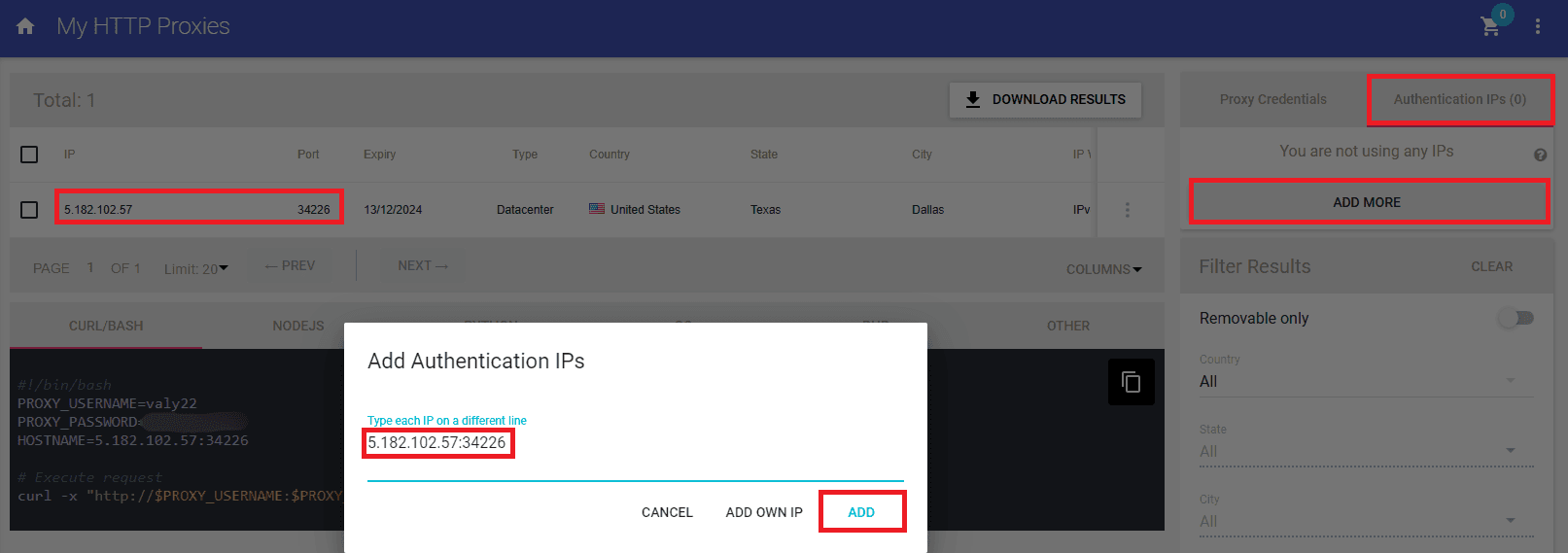
For the C# example, go and whitelist your IP in the Anonymous Proxies Dashboard. This way, you can connect without entering your username and password credentials, since if you want to handle proxy authentication directly in Selenium is a pretty complicated process.
Conclusion
Selenium is a very powerful tool, both for web scraping and for automated browser interaction and if you combine it with Anonymous Proxies, you are going to get the most out of it. Now, if you have any further questions about integrating Anonymous Proxies with Selenium, don't hesitate to contact our support team. For more integration tutorials, check our integrations page.
You’ll always need to adjust your username and your password fields with the username and password credentials that are in the Anonymous Proxies Dashboard if you didn't whitelist your IP.

Buy Backconnect Proxies
Rotating IPs on every request. Scale scraping and automation without manual IP management.
More browser-automation Proxy Integrations
See more browser-automation integrations that work seamlessly with Anonymous Proxies.

Proxy Integration With AIOHTTP
This tutorial will show you how to use Python’s AIOHTTP and asyncio with Anonymous Proxies’ HTTP and SOCKS5 proxies, then move on to simple proxy rotation examples for larger scraping runs.
Proxy Integration With Puppeteer
This step-by-step guide will show you how to integrate Anonymous Proxies' proxies in Puppeteer, whether you're using static proxies, rotating proxies, or proxy lists.
Proxy Integration With Playwright
This step-by-step guide is going to show you how to set up Anonymous proxies with Playwright using Node.js and Python.