
Forward Proxy vs Reverse Proxy: Which One You Need
Forward proxy vs reverse proxy explained simply: one protects clients, the other protects servers. Learn how each works and which one your task needs.
Valentin Ghita
Technical Writer, Marketing, Research
Mihalcea Romeo
Co-Founder, CTO
TL;DR: The short version
- A forward proxy stands in front of you and carries your traffic out to the internet. Sites will see its IP instead of yours, and this is what makes privacy, scraping and geo-access possible.
- Reverse proxies guard the other end. One sits in front of a site's servers, fields everything coming in, and covers load balancing, caching, and security while the origin's address stays hidden.
- Hiding your own IP puts you in forward proxy territory. Shielding a site you run is what reverse proxies are for.
- Any given proxy software can take either role. It just can't work both sides of the same traffic at once.
Which one you need
The choice comes down to which side of the connection you're on. If you're the one visiting websites and you want control over how they see you, get a forward proxy. If you own the website and want control over how visitors reach it, set up a reverse proxy.
Most people typing this question into a search bar need a forward proxy. Scraping data and hiding your real IP both fall on the forward side, along with nearly every other everyday proxy task. A reverse proxy only matters once you run a site or app and need to manage the traffic hitting your own servers.
The rest of this page explains how each one works and when to use it. Skip ahead to the side that matches you.

Buy Rotating Residential Proxies
Real homeowner IPs that rotate on every request. Near-zero block rates for scraping and automation.
Forward proxy vs reverse proxy at a glance
Here's the whole comparison in one table, and every section below expands on one of its rows.
| Attribute | Forward proxy | Reverse proxy |
|---|---|---|
| Represents | The client (user) | The server (origin) |
| Sits in front of | Clients | Servers |
| Traffic direction | Outbound (client to internet) | Inbound (internet to server) |
| Hides | The client's IP from sites | The origin server's IP from visitors |
| Who runs it | Users and organizations | Website and app owners |
| Main jobs | Anonymity, scraping, geo-access, filtering | Load balancing, caching, SSL termination, security |
| Examples | Residential, datacenter, ISP, SOCKS5 proxies | NGINX, HAProxy, Cloudflare, load balancers |
What a forward proxy does
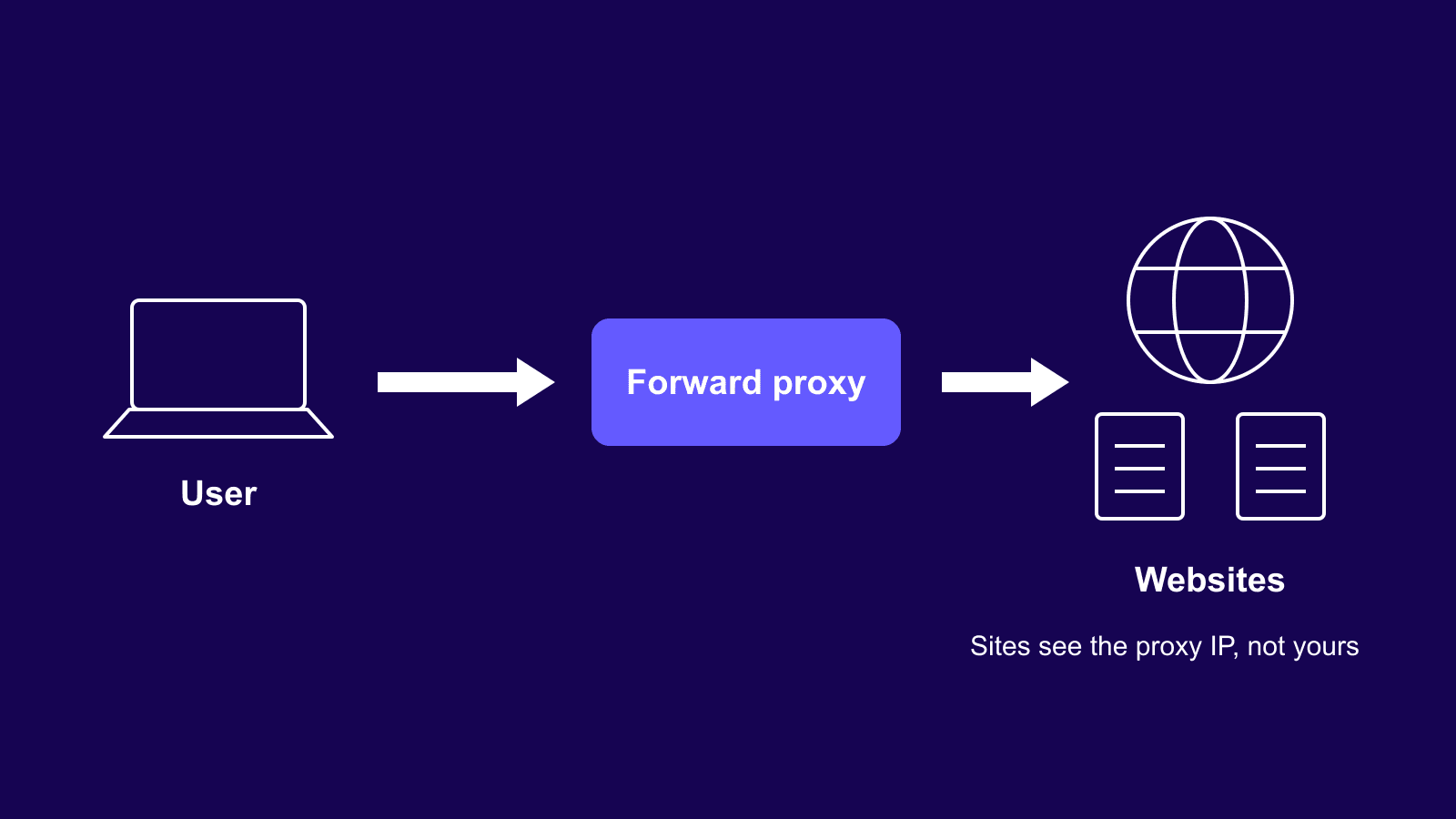
The forward proxy breaks the path of a regular HTTP request. In a regular setup, your browser sends a request for a web page to the site, which replies directly to you, and writes your IP address in its log. If there is a forward proxy involved, you send a request to the proxy, which forwards it to the site, and gets an answer back via the same relay. The site never deals with you at all. As far as it can tell, the proxy's IP is the visitor.
For an individual, the payoff is anonymity, since the address left behind in every site's log belongs to the proxy rather than to you. An office runs one for a different reason. Funnel all outbound traffic through one chokepoint and admins get to choose exactly which sites employees can reach. A shared proxy saves bandwidth too, because pages that hundreds of people behind it keep requesting can come out of its cache instead of being fetched fresh each time.
Direction is the part to keep straight. Everything a forward proxy touches moves one way, from someone's device out toward the internet, and the sites at the far end have no way of knowing who set the request in motion. Hiding that is the entire reason the tool exists.
What a reverse proxy does
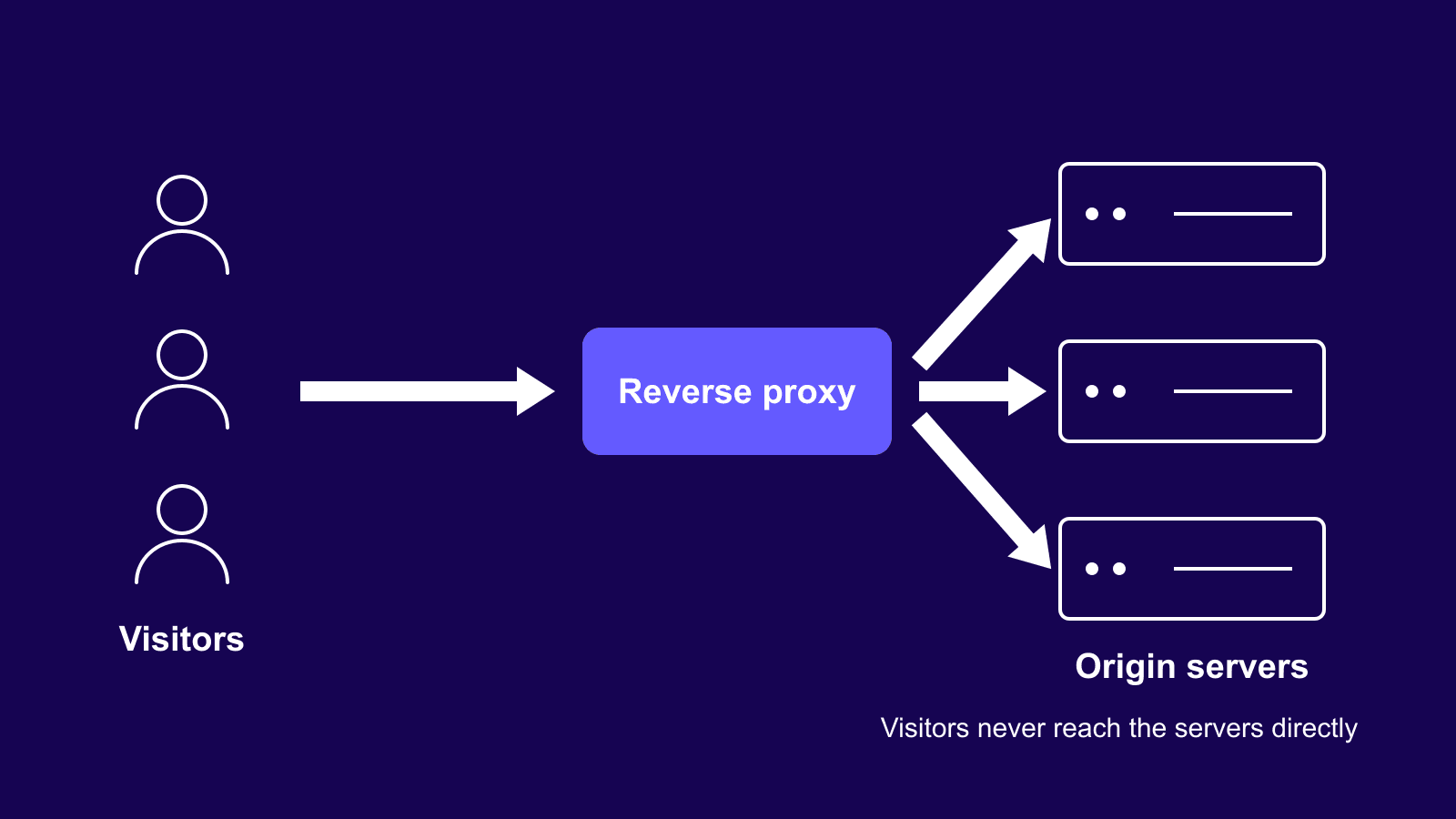
A reverse proxy, however, does everything differently. It works from the side of the website. The reverse proxy is located in front of one or several servers, and every request from outside gets processed by it before reaching the servers that process your request. When you open a website made using the reverse proxy, you actually get your request answered by the proxy itself.
The reasons site owners bother are practical. A surge of visitors gets split across several machines, so no single one buckles under the load. Popular pages can be answered straight from the proxy's stored copy without troubling the backend each time. SSL lives in one spot, on the proxy, instead of being configured separately on every server behind it. And because outsiders only ever reach the proxy, the origin servers' real IPs stay off the radar of attackers hunting for targets.
You have almost certainly passed through a few dozen reverse proxies today without registering it, because most big sites run one as standard.
The real difference: who the proxy represents
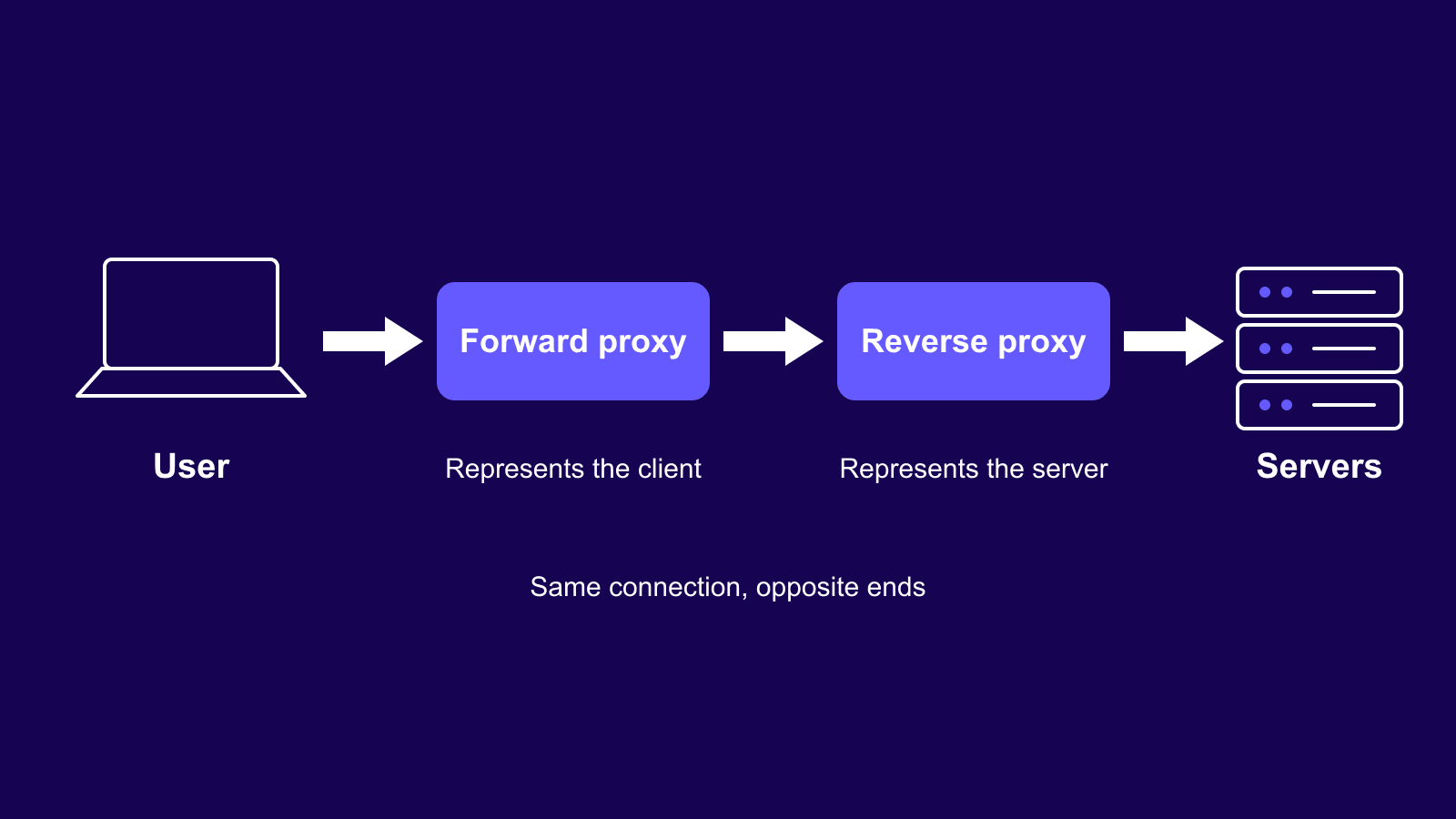
Strip away the details and what's left is who the proxy works for. A forward proxy works for the client. It speaks to the internet on your behalf and keeps your identity out of the exchange. A reverse proxy works for the server. It faces the public on the website's behalf and keeps the machines behind it out of reach.
Both are middlemen sitting on the same road between a user and a website. The only thing that changes is which end of the road they guard. Once that clicks, every feature list makes sense. Anonymity and geo-access belong to the client side. Load balancing and origin protection belong to the server side.
When you need a forward proxy
This is the side almost everyone shopping for a proxy lands on, and it's the side Anonymous Proxies covers. A few situations where a forward proxy earns its keep:
Web scraping is the big one. Sites throttle or block addresses that send too many requests, so scrapers route their traffic through rotating residential proxies that look like ordinary home connections. Our guide to the best proxies for web scraping goes deeper on picking a setup.
Rotation matters well beyond scraping too. A pool of backconnect proxies hands you a fresh address on a schedule through a single gateway, which keeps long automated jobs from tripping rate limits halfway through.
Then there's location work. Marketers check how ads and prices display in other countries by browsing from local IPs, and regular users pull the same trick to reach content locked to a region. On office networks, admins run forward proxies to filter and log what leaves the building.
If your task involves reaching someone else's site on your own terms, this is your category.
When you need a reverse proxy
You need one when you're the destination of the traffic. If your site runs on more than one server, a reverse proxy decides which machine answers each request, and no visitor's browser ever knows the difference. If one product page suddenly goes viral, cached copies absorb the hit. And when managing certificates across five servers gets old, SSL can terminate at the proxy instead.
The popular tools here are NGINX, HAProxy, and Cloudflare. The practical divide sits right there: a reverse proxy is something you set up for a site you run, not an IP address you buy. It also does nothing for your personal privacy while browsing. If that's what brought you here, a forward proxy or a VPN is the right lane, and our proxy vs VPN comparison sorts out which of those two fits.
Can a single proxy be both?
Yes, and this is where people get tripped up. Forward and reverse aren't different products. They're different jobs. The same software can be configured for either one, and the role comes entirely from where it sits in the connection, not from the code itself.
What it can't do is hold both jobs for the same traffic at once. On any given request, a proxy either fronts the client or fronts the server. NGINX is the usual example: admins deploy it as a reverse proxy all the time, while turning it into a forward proxy takes a deliberate, separate setup most never bother with.
Which forward proxy type to pick
Once you know you're on the forward side, the real decision is which type of IP sits behind your proxy, so here's how the common options stack up.
| Proxy type | Best for | Trust level | Speed | Cost |
|---|---|---|---|---|
| Residential | Scraping strict sites, geo-targeting | High | Medium | High |
| ISP | Long sessions on sensitive sites | High | High | Medium |
| Datacenter | High-volume tasks on relaxed sites | Low | Highest | Low |
| Mobile | The toughest mobile-first targets | Highest | Medium | Highest |
| SOCKS5 | Traffic beyond regular browsing (apps, games, torrents) | Depends on IP type | High | Medium |
As a rough guide, datacenter proxies win on price and raw speed for high-volume jobs against relaxed targets, while ISP proxies hold stable, trusted addresses for accounts and sessions that need to last. Residential and mobile IPs cost more but survive the strictest sites, and SOCKS5 proxies carry traffic that isn't ordinary web browsing at all, from apps to torrents. For a closer look at the two most common choices, see residential and datacenter proxies compared.
Bottom line
Pick your side and the rest follows. If you're reaching out to the web, you want a forward proxy, and your only real question is which IP type fits the task. If traffic is coming to you, you want a reverse proxy in front of your own servers. Nobody needs both for the same problem, and nobody should buy one when the other solves it. Still weighing your options? Our support team will point you to the right setup.
Frequently asked questions
Frequently Asked Questions
Is a VPN a forward proxy or a reverse proxy?
A VPN acts like a forward proxy. It carries your outbound traffic and swaps your IP along the way. The only is how much ground each one covers. The traffic going out from your computer is encrypted by a VPN, but not by a proxy at all.
Is Cloudflare a forward or reverse proxy?
Cloudflare works as a reverse proxy. If you route a domain to it, users will be sent to Cloudflare’s server instead of the website's server. This server filters out any bad traffic and withstands DDoS attacks. Also, this server delivers content from a data center that is close to a user. That’s why there may be an error message by Cloudflare if the underlying website is down.
Is NGINX a forward or reverse proxy?
NGINX is a reverse proxy in nearly every setups you will come across. While it can be molded to act as a forward proxy, its open-source software does not have tunneling capabilities required by browsers, so when people need a forward proxy, they'll usually look for another dedicated tool such as Squid.
Is a reverse proxy the same as a load balancer?
No, though they overlap a lot. A load balancer does one thing, splitting requests across multiple servers. A reverse proxy is the bigger umbrella, and balancing is just one of the jobs it can take on. Every serious load balancer is a reverse proxy at heart, but plenty of reverse proxies guard a single server and never balance anything.
Is a CDN a reverse proxy?
Yes. A CDN is a network of reverse proxies spread across the world, tuned mainly for caching, so copies of your content sit close to visitors and pages load fast everywhere. Each edge location accepts requests on behalf of your origin, exactly like a standard reverse proxy would.
Is an API gateway a reverse proxy?
An API gateway is a reverse proxy with extra duties, yes. Beyond passing requests to the services behind it, it checks who's calling, enforces rate limits, and can translate between request formats. Teams juggling lots of small services use one as the single front door for everything.
Do proxies slow down your connection?
Every proxy adds one extra stop, so a small delay is unavoidable. Whether you ever notice depends on the provider. Well-run networks with nearby servers keep the overhead to a few milliseconds, while real slowdowns almost always come from overloaded or poorly routed services rather than the proxy step itself.